It is not only a fully functional graph visualization library, but also an explorer of data relationships.
!!!###!!!title=plugin contribute——VisActor/VTable tutorial documents!!!###!!!!!!###!!!description=When businesses use VTable, they may need customized functionality, which can be implemented through plugins. Extracting common functionality into plugins avoids reinventing the wheel and makes it easier for other businesses to use these features.Sharing plugins can improve development efficiency and reduce maintenance costs! We encourage everyone to actively contribute plugins and help improve the VTable ecosystem!!!!###!!!
Contributing Plugins
When businesses use VTable, they may need customized functionality, which can be implemented through plugins. Extracting common functionality into plugins avoids reinventing the wheel and makes it easier for other businesses to use these features.
Sharing plugins can improve development efficiency and reduce maintenance costs! We encourage everyone to actively contribute plugins and help improve the VTable ecosystem!
Guidelines for Contributing Plugins
Plugins must follow VTable's plugin specifications.
Plugins must include detailed documentation, including parameter descriptions, usage examples, etc.
Plugin Specifications
Interface Specifications
Plugins need to implement the VTable.plugins.IVTablePlugin interface.
The runTime parameter specifies when the plugin will run, configuring it with event types from TableEvents.
The Gantt plugin needs to implement the VTableGantt.plugins.IGanttPlugin interface.
// Plugin unified interface
export interface IGanttPlugin {
// Plugin unique identifier
id: string;
// Plugin namename: string;
// Plugin runtime trigger, ifnot passed in, will run directly during the Gantt build bydefault runTime?: EVENT_TYPES[keyof EVENT_TYPES][];
// Initialization method run: (...args: any[]) => void;
// Updatemethod, calledwhen Gantt data orconfiguration updates
update?: () => void;
// Destruction method, calledbefore Gantt instance is destroyed
release?: (gantt: Gantt) => void;
}
The runTime parameter specifies when the plugin will run, configuring it with event types from EVENT_TYPES.
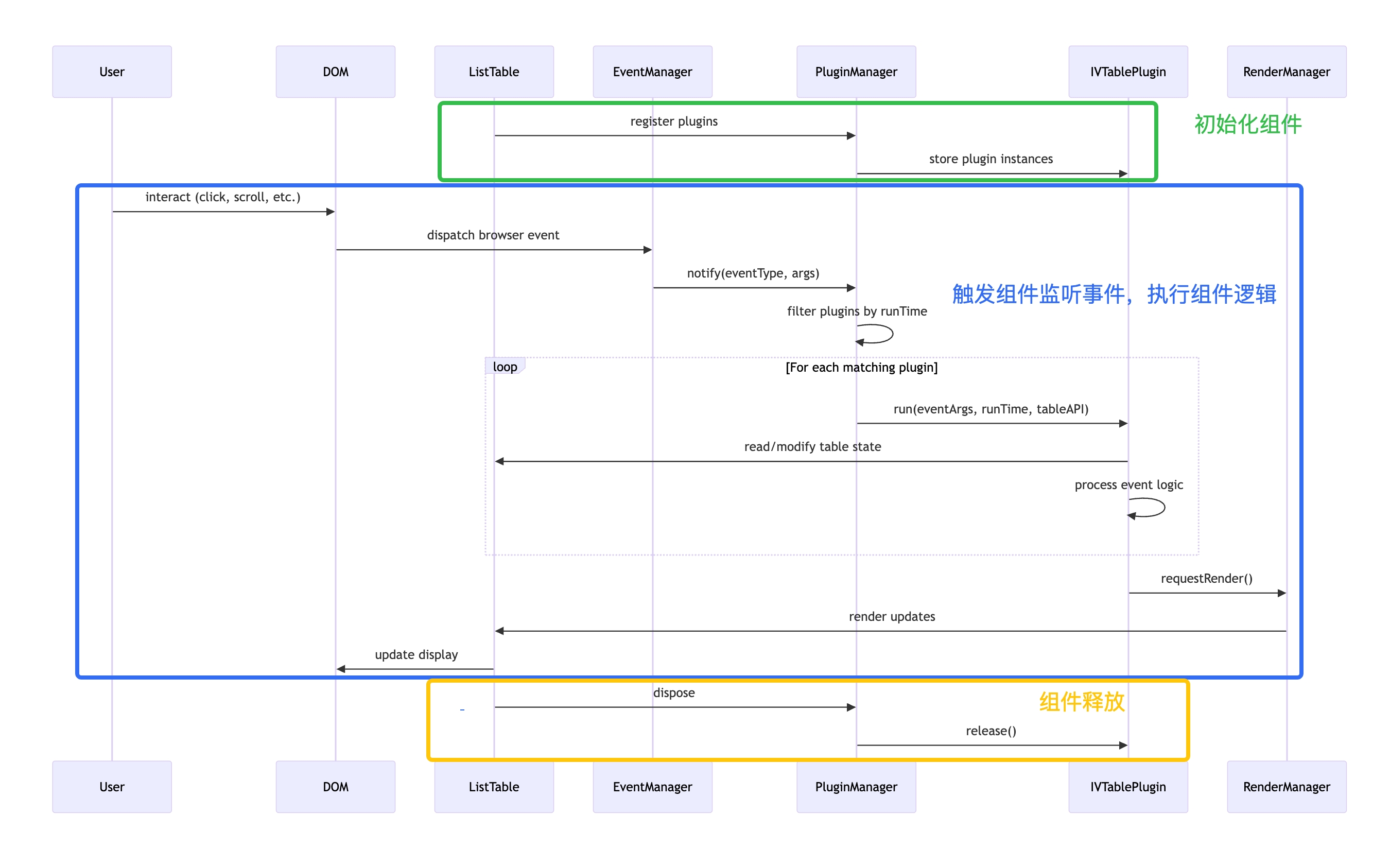
Component Lifecycle Process:
Attached Mermaid sequence diagram code (for future updates, you can modify this code and update the image above):
sequenceDiagram
    participant User
    participant DOM
    participant ListTable
    participant EventManager
    participant PluginManager
    participant Plugin as VTablePlugin
    participant RenderManager

    %% Initialization
    ListTable->>PluginManager: register plugins
    PluginManager->>Plugin: store plugin instances

    %% User interaction flow
    User->>DOM: interact (click, scroll, etc.)
    DOM->>EventManager: dispatch browser event
    EventManager->>PluginManager: notify(eventType, args)
    PluginManager->>PluginManager: filter plugins by runTime

    loop For each matching plugin
        PluginManager->>Plugin: run(eventArgs, runTime, tableAPI)
        Plugin->>ListTable: read/modify table state
        Plugin->>Plugin: process event logic
    end

    Plugin->>ListTable: render request to update table
    ListTable->>DOM: update display


    %% table.updateOption
    ListTable->>PluginManager: updateOption
    PluginManager->>Plugin: updatePlugins()
    %% table.release
    ListTable->>PluginManager: release
    PluginManager->>Plugin: release()
From the above diagram, you can understand the runtime timing of plugins:
The key role of runTime in plugins is to specify which VTable events they depend on.
In the plugin's run method, you can access the table instance, configuration, and data; you should also handle the plugin's specific business logic in the run method.
Remember to release resources in the plugin's release method to avoid memory leaks.
Plugin Documentation
Plugins need to provide detailed documentation, including parameter descriptions, usage examples, etc.
Documentation generally should include the following:
Plugin name
Plugin description
Plugin parameter descriptions
Plugin usage examples
Plugin notes and considerations
Plugin source code link
Documentation should be placed in the docs/assets/plugins directory, with the filename plugin-name.md.