It is not only a fully functional graph visualization library, but also an explorer of data relationships.
!!!###!!!title=hover_cell——VisActor/VTable tutorial documents!!!###!!!!!!###!!!description=Hover interaction is a very useful feature when using VTable for data analytics. With hover interaction, we can highlight cells, entire rows, or entire columns of data when the mouse hovers, helping users better focus on specific information. This tutorial will describe how to use and customize hover interaction in VTable.!!!###!!!
Hover interaction
Hover interaction is a very useful feature when using VTable for data analytics. With hover interaction, we can highlight cells, entire rows, or entire columns of data when the mouse hovers, helping users better focus on specific information. This tutorial will describe how to use and customize hover interaction in VTable.
Patterns of hover interaction
VTable supports four hover interaction modes: 'cross', 'column', 'row' and'cell '. By default, the hover interaction mode is'cross'. You can passhoverModeOptions to configure.
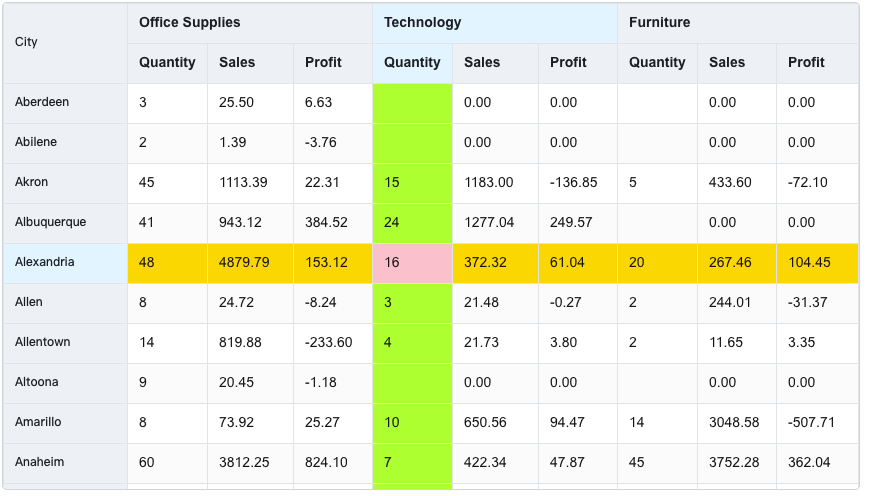
For example, set the hover interaction mode to line cross:
As shown in the figure above, the background color of the cell when the mouse hovers is pink, the background color of the entire row where the mouse hovers is gold, and the background color of the entire column where the mouse hovers is green-yellow.
Disable hover interaction
VTable allows disabling hover interaction, which is useful for some scenarios where visual interference needs to be reduced.
To disable hover interaction, you canhover.disableHoverOptions are set totrueSee also:
In addition, there are special needs scenarios that only prohibit hover interaction for a certain column, you can usecolumns.disableHeaderHoverandcolumns.disableHeaderHoverOption:
When hover interaction is disabled, there will be no highlighting when hovering.
So far, we have introduced the hover interaction in VTable, including interactive mode, custom style and disabling hover interaction. By mastering these functions, you can more flexibly customize the hover interaction of the table according to actual needs.