It is not only a fully functional graph visualization library, but also an explorer of data relationships.
!!!###!!!title=Rect——VisActor/VGraph tutorial documents!!!###!!!!!!###!!!description=A Rectangle (Rect) is a graphic object used to create a rectangular graphic instance, containing information such as the rectangle's position, size, and corner radius, for the rendering engine to draw and interact with.!!!###!!!
Rectangle (Rect)
A Rectangle (Rect) is a graphic object used to create a rectangular graphic instance, containing information such as the rectangle's position, size, and corner radius, for the rendering engine to draw and interact with.
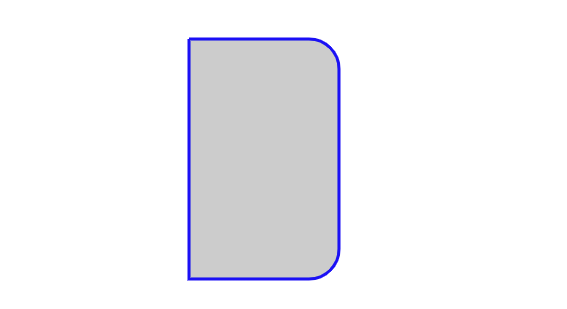
Example
import { Rect } from'@visactor/vgraph';
const rect = new Rect({
left: 80,
top: 20,
width: 50,
height: 80,
strokeStyle: 'blue',
fillStyle: '#ccc',
radius: [0, 10],
});
Rect Configuration
Field
Type
Description
left
number
The left coordinate of the rectangle.
top
number
The top coordinate of the rectangle.
width
number
The width of the rectangle.
height
number
The height of the rectangle.
radius
number | number[]
The corner radius of the rectangle.
Note: For the rectangle's corner radius, if it is specified as a number r, then the corner radius of all four corners of the rectangle is r. If it is specified as an array of length 4, [r0, r1, r2, r3], then it specifies the corner radii of the top-left, top-right, bottom-right, and bottom-left corners of the rectangle, respectively. If it is specified as an array of length 2, [r0, r1], then it specifies the corner radii of the top-left, top-right, bottom-right, and bottom-left corners of the rectangle as r0, r1, r1, and r0, respectively.
Common Configurations
The following are common configurations for all graphic objects:
Clipping shape. Sets the specified shape as the clipping path. The part within the clipping shape's path will be retained, and the rest will be culled. Refer to CanvasRenderingContext2D.clip()
cursor
string
The type of cursor when this shape gains focus. For details, refer to CSS Cursor
Note: Color strings currently support the following formats:
Type
Example
Description
rgb
rgb(255, 255, 255)
White represented in RGB mode
rgba
rgba(255, 255, 255, 1.0)
White represented in RGBA mode
hsl
hsl(13, 100%, 10%)
Color represented in HSL mode, equivalent to rgb(56, 12, 0)
hsla
hsla(13, 100%, 10%, 0.4)
Color represented in HSL mode, equivalent to rgba(56, 12, 0, 0.4)
hex
#fff
Pure color represented by a three-digit hexadecimal number, case-insensitive
hex
#FF00FF
Pure color represented by a six-digit hexadecimal number, case-insensitive
hex
#3037ffff
Color with transparency represented by an eight-digit hexadecimal number, case-insensitive
name
cyan
Color represented by its name
linear gradient
l(0) 0:#fff 0.5:#7ec2f3 1:#1890ff
Linear gradient, the expression is l(deg) step1:color1 step2:color2 ..., which means a linear gradient with a linear tilt angle of deg, and the colors are interpolated at step1, step2... with color1, color2...
radial gradient
r(0.5,0.5,0) 0:#fff 0.5:#7ec2f3 1:#1890ff
Radial gradient, the expression is r(cx, cy, r0) r1:color1 r2:color2 ..., which means a radial gradient centered at the relative coordinate (cx, cy) within the bounding box, with a starting radius r0, and the colors are interpolated at radii r1, r2... with color1, color2...
picture
p(a)./pattern.png
Image, the expression is p(repeat)url. When repeat is a, it means the background repeat mode is repeat; when it is x, it means repeat-x; when it is y, it means repeat-y; when it is n, it means no-repeat. The parameter url represents the image path. Refer to CSS background-repeat
Accessible Properties
Property
Type
Description
type
'rect'
Shape type
capture
boolean
Whether it is captured by focus
animating
boolean
Whether it is an animation
destroyed
boolean
Whether it has been destroyed
parent
any
Parent shape node
Instance Methods
Instance Method
Return Value
Description
getBBox()
BBox
Gets the bounding box position and size
translate(x: number, y: number)
void
Translates
scale(xRatio: number, yRatio?: number)
void
Scales
rotate(deg: number, radian: boolean)
void
Rotates around the center. radian is used to specify whether the parameter deg is in radians. If it is true, it is in radians; otherwise, it is in degrees. The default is false.
rawRotate(deg: number, radian: boolean)
void
Rotates based on the matrix origin, with the same definition as rotate
clone()
IShape
Gets a copy of a shape
show()
void
Shows the shape
hide()
void
Hides the shape
get(k: string)
any
Gets the property named k of this shape
set(k: string, v: any)
IShape
Sets the value of the property named k of this shape to v