


Built-in Edges
Built-in edges include the following types. For usage, see Built-in Edges
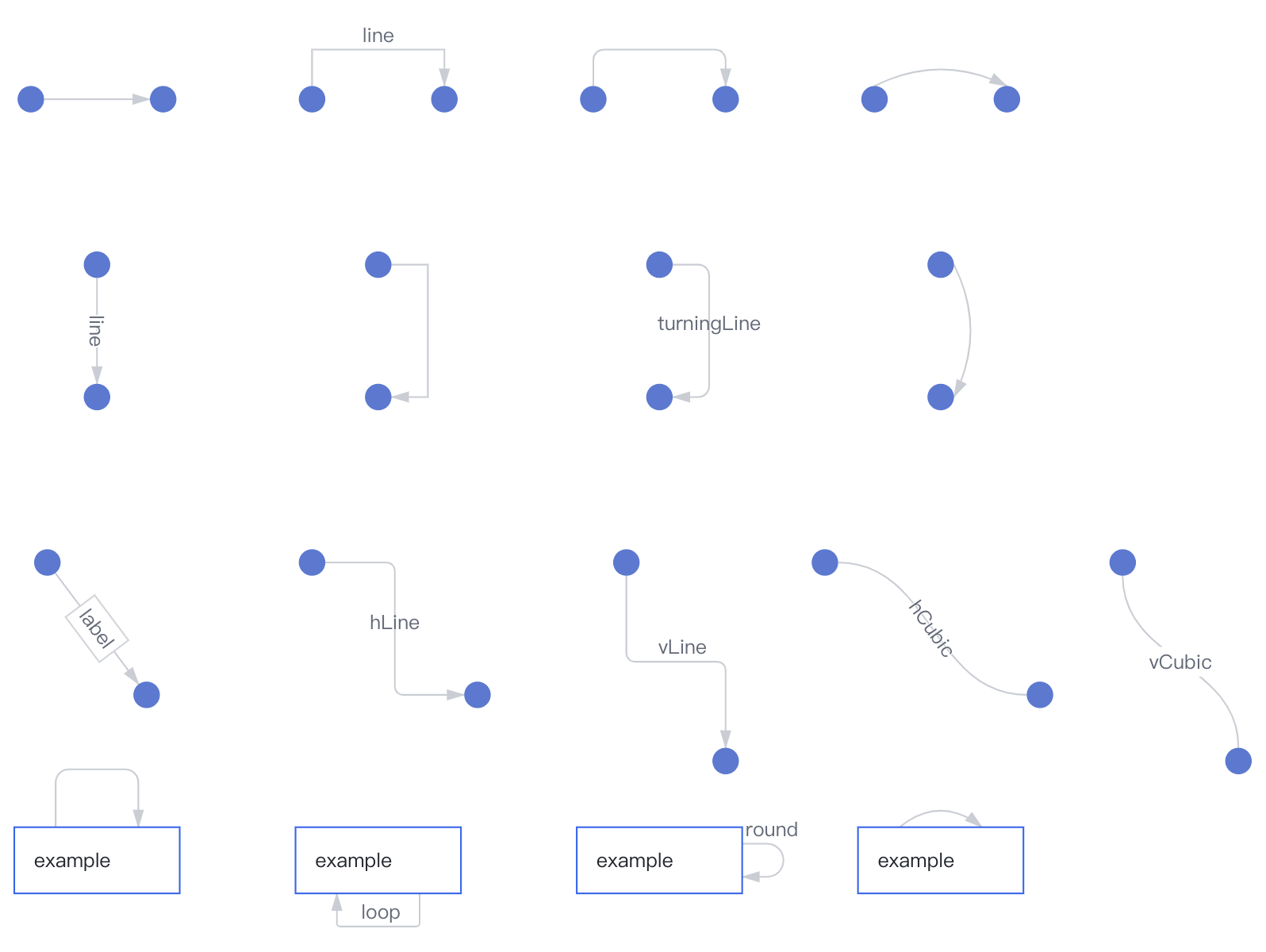
line
A normal polyline that connects several control points in sequence from the start point to the end point.
| Field | Type | Default | Description |
|---|---|---|---|
| controlPoints | number[][] | Optional, provides several control points other than the start and end points. The polyline will pass through these points in sequence. |
hLine
A horizontal turning line that extends from the start point to the end point in a horizontal, vertical, horizontal manner, resembling a Z-shaped polyline.
| Field | Type | Default | Description |
|---|---|---|---|
| ignoreControlPoints | boolean | false | The layout algorithm of vGraph may write control points on the edge. This configuration can be enabled to forcibly ignore them. |
| styles.radius | number | 5 | The radius of the corner. |
| styles.curvePosition | number | 0.5 | The x-coordinate interpolation of the corner. |
| styles.curveOffset | number | 0 | The x-coordinate offset pixel value of the corner. |
vLine
A vertical turning line that extends from the start point to the end point in a vertical, horizontal, vertical manner, resembling an N-shaped polyline.
| Field | Type | Default | Description |
|---|---|---|---|
| ignoreControlPoints | boolean | false | The layout algorithm of vGraph may write control points on the edge. This configuration can be enabled to forcibly ignore them. |
| styles.radius | number | 5 | The radius of the corner. |
| styles.curvePosition | number | 0.5 | The y-coordinate interpolation of the corner. |
| styles.curveOffset | number | 0 | The y-coordinate offset pixel value of the corner. |
turningLine
A free-form turning line that can be customized with several control points from the start point to the end point.
| Field | Type | Default | Description |
|---|---|---|---|
| controlPoints | number[][] | Optional, provides several control points other than the start and end points. If this information is provided, styles.curvePosition will be ignored. | |
| styles.radius | number | The radius of the corner. If this information is provided, styles.radian will be ignored (the visual effect of obtuse and acute angles varies greatly when using radius, so it is not recommended to use radius). | |
| styles.radian | number | 10 | The arc length of the corner. |
| styles.curvePosition | number[][] | The interpolation information of each control point relative to the center coordinates of the start node and the center coordinates of the end node. |
quadratic
A quadratic Bézier curve that requires one control point in addition to the start and end points.
| Field | Type | Default | Description |
|---|---|---|---|
| controlPoints | number[][] | Optional, provides one control point other than the start and end points. If this value is provided, the following configuration items will be automatically ignored. | |
| styles.curveOffset | number | -20 | The vertical distance of the control point from this vector. |
| styles.curvePosition | number | 0.5 | The interpolation of the intersection of the perpendicular line of the control point and this vector on this vector. |
cubic
A cubic Bézier curve, which is determined by four points P0, P1, P2, and P3. In addition to the start point P0 and the end point P3, two control points P1 and P2 are required.
| Field | Type | Default | Description |
|---|---|---|---|
| controlPoints | number[][] | Optional, provides two control points other than the start and end points. If this value is provided, the following configuration items will be automatically ignored. | |
| styles.curveOffset | number[] | [-20, 20] | The vertical distance of each control point from this vector. |
| styles.curvePosition | number[] | [0.5, 0.5] | The interpolation of the intersection of the perpendicular line of each control point and this vector on this vector. |
hCubic
A horizontal cubic Bézier curve, where the y-coordinate of P1 is the same as the start point P0, and the y-coordinate of P2 is the same as the end point P3.
| Field | Type | Default | Description |
|---|---|---|---|
| styles.curvePosition | number | [0.5, 0.5] | The x-coordinate interpolation of P1 and P2 within the start and end points. |
vCubic
A vertical cubic Bézier curve, where the x-coordinate of P1 is the same as the start point P0, and the x-coordinate of P2 is the same as the end point P3.
| Field | Type | Default | Description |
|---|---|---|---|
| styles.curvePosition | number | [0.5, 0.5] | The y-coordinate interpolation of P1 and P2 within the start and end points. |
loop
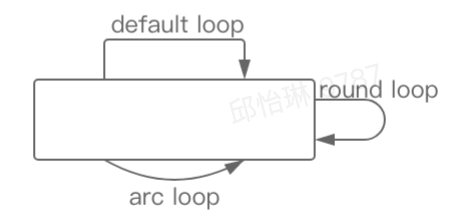
A self-loop is an edge that points from a node to itself. vgraph provides three types of self-loop styles that can be defined.
| Field | Type | Default | Description |
|---|---|---|---|
| loop.theme | string | default | The type of self-loop. Optional values are 'default' | 'round' | 'arc'. |
| loop.position | string | top | The position of the self-loop. Optional values are 'top' | 'bottom' | 'left' | 'right'. |
| loop.dist | number | auto | The distance between the highest point of the self-loop and the node. |