It is not only a fully functional graph visualization library, but also an explorer of data relationships.
!!!###!!!title=Events——VisActor/VGraph tutorial documents!!!###!!!!!!###!!!description=vgraph has three granularities of events to meet the interaction needs of different scenarios. They are:- Graph level: Corresponds to Graph and TreeGraph events.- Instance level: Corresponds to events for Node, Edge, and Group instances.- Graphic level: Corresponds to basic graphic object events that visually compose each type of instance.Events will bubble up from the graphic to the instance and then to the graph. For example, if a user clicks on an icon on a node, the following will be triggered in order:- The icon's click event- The node's click event- The graph's node:click event- The graph's click event<p><img src="/vgraph/guide/event.png" width="400"></p>The vgraph event object is composed as follows:```typescriptconst e = { // Event type, e.g., click, mouseenter type: string; // The target object of the action, often corresponding to the event granularity mentioned above target: Graph | Node | Edge | Group | Shape; // The node related to the event's target object, which is the graphic object that actually triggered the event. Exists only in graph events and instance events. relatedTarget: Shape; // The horizontal x-coordinate and vertical y-coordinate of the mouse pointer relative to the top-left corner of the browser viewport when the event is triggered clientX: number; clientY: number; // The native browser event nativeEvent: Event; // Stops event bubbling stopPropagation(): void;};```!!!###!!!
Events
vgraph has three granularities of events to meet the interaction needs of different scenarios. They are:
Graph level: Corresponds to Graph and TreeGraph events.
Instance level: Corresponds to events for Node, Edge, and Group instances.
Graphic level: Corresponds to basic graphic object events that visually compose each type of instance.
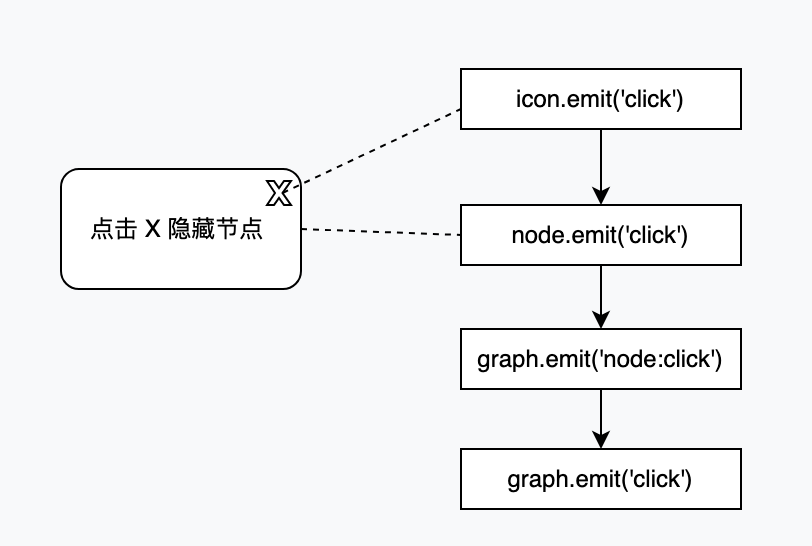
Events will bubble up from the graphic to the instance and then to the graph. For example, if a user clicks on an icon on a node, the following will be triggered in order:
The icon's click event
The node's click event
The graph's node:click event
The graph's click event
The vgraph event object is composed as follows:
const e = {
// Event type, e.g., click, mouseentertype: string;
// The target object of the action, often corresponding to the event granularity mentioned above target: Graph | Node | Edge | Group | Shape;
// The node related to the event's target object, which is the graphic object that actually triggered the event. Exists only in graph events and instance events. relatedTarget: Shape;
// The horizontal x-coordinate and vertical y-coordinate of the mouse pointer relative to the top-left corner of the browser viewport when the event is triggered clientX: number;
clientY: number;
// The native browser event nativeEvent: Event;
// Stops event bubbling stopPropagation(): void;
};
graph Events
The most commonly used are graph-level events. On the graph, you can listen for and react to instance events by category, supporting native event types on nodes, edges, and groups. The event format is ${entity.type}:${eventType}. For example, a node click event is defined as graph.on('node:click', eventHandler). The currently supported event types are:
click
dblclick
mouseenter
mouseleave
mouseover
mouseout
mousedown
mouseup
mousemove
contextmenu
Due to the many needs for interaction with the blank area of the canvas in actual business, graph has also designed events for blank area interaction. For example, to listen for a click event on a blank area, it is recommended to use graph.on('canvas:click', callback).
At the same time, as the top-level container of the graph, the graph can also directly listen to atomic events, which will be triggered whenever the corresponding event occurs anywhere in the graph. At this point, you can use e.relatedTarget to distinguish the object that triggered the event.
In addition, the graph instance also supports interaction-level events. vGraph exports the constant GRAPH_EVENTS for easy reference. The specific events are listed below:
Event Name
Constant
Description
change
GRAPH_EVENTS.CHANGE
A general event for data changes in the graph, including adding, deleting, and modifying elements, layout, etc.
transformed
GRAPH_EVENTS.TRANSFORMED
Event for changes in the graph's viewport.
changesize
GRAPH_EVENTS.CHANGE_SIZE
Event for updating the canvas size.
add:start
GRAPH_EVENTS.ADD_START
Data is about to be added.
add:end
GRAPH_EVENTS.ADD_END
Data addition is complete.
update:start
GRAPH_EVENTS.UPDATE_START
Data is about to be updated.
update:end
GRAPH_EVENTS.UPDATE_END
Data update is complete.
visibility:end
GRAPH_EVENTS.VISIBILITY_END
The visibility of a graphic element has changed.
remove:start
GRAPH_EVENTS.REMOVE_START
Data is about to be deleted.
remove:end
GRAPH_EVENTS.REMOVE_END
Data deletion is complete.
state:start
GRAPH_EVENTS.STATE_START
The state of a graphic element is about to change.
state:end
GRAPH_EVENTS.STATE_END
The state of a graphic element has been updated.
state:start
GRAPH_EVENTS.STATE_START
The state of a graphic element is about to change, used for actively updating the state via setState.
state:end
GRAPH_EVENTS.STATE_END
The state of a graphic element has been updated, used for actively updating the state via setState.
batchstate:start
GRAPH_EVENTS.BATCH_STATE_START
The state of a graphic element is about to change, used for listening to batch scenarios in editing scenes, and will not trigger state:start at the same time.
batchstate:end
GRAPH_EVENTS.BATCH_STATE_END
The state of a graphic element has been updated, used for listening to batch scenarios in editing scenes, and will not trigger state:end at the same time.
layout:start
GRAPH_EVENTS.LAYOUT_START
About to re-layout.
layout:end
GRAPH_EVENTS.LAYOUT_END
Layout is complete.
data:start
GRAPH_EVENTS.DATA_START
About to switch to new data.
data:end
GRAPH_EVENTS.DATA_END
Switched to new data.
updatedata:start
GRAPH_EVENTS.UPDATE_DATA_START
About to update the graph with new data.
updatedata:end
GRAPH_EVENTS.UPDATE_DATA_END
Graph update with new data is complete.
clear:start
GRAPH_EVENTS.CLEAR_START
About to clear data.
clear:end
GRAPH_EVENTS.CLEAR_END
Data has been cleared.
animationframe
GRAPH_EVENTS.ANIMATION_FRAME
Animation frame refresh.
animation:start
GRAPH_EVENTS.ANIMATION_START
Start animation.
animation:end
GRAPH_EVENTS.ANIMATION_END
All current animations are complete.
draw:start
GRAPH_EVENTS.DRAW_START
About to re-render.
draw:end
GRAPH_EVENTS.DRAW_END
Rendering complete event.
Instance Events
Instance-level events involve listening to a single instance and reacting to it. For example, node.on('click', callback). A click event on a node will bubble up to the graph, so the node:click event on the graph will also be triggered subsequently. This is recommended for special operations on a single node.
Graphic Events
Graphic-level events are mostly used for custom interactions of personalized graphics for nodes, lines, and groups. For example, in the bubbling example above, sometimes you don't want a click on an icon to trigger a node-level click event. In such cases, you can listen to the icon event to handle it.