It is not only a fully functional graph visualization library, but also an explorer of data relationships.
!!!###!!!title=DAG Layout——VisActor/VGraph tutorial documents!!!###!!!!!!###!!!description=A Directed Acyclic Graph (DAG) is a directed graph with no directed cycles. It has strict topological properties and a strong ability to express processes. The DAG layout is a layout algorithm that automatically calculates the levels and positions of nodes based on the direction of the edges in the graph data.The characteristic of a directed graph layout is that it can clearly display the hierarchical levels of node data and try to keep the direction of the lines consistent. Therefore, it is often used to display state transitions and workflows. vGraph has studied many directed graph scenarios and implemented a DAG layout algorithm that can be applied to most scenarios. The usage of the DAG layout algorithm is as follows:```javascriptimport { Graph, DAGLayout } from '@visactor/vgraph';// Recommended usage, configured in Graphconst graph = new Graph({ layout: { type: 'dag', options: layoutOptions }});// Second usage, direct instantiationconst graph = new Graph(...);graph.data(someData);const layout = new DAGLayout({ graph, ...layoutOptions});graph.set('layout', layout);```!!!###!!!
Directed Acyclic Graph Layout (DAGLayout)
A Directed Acyclic Graph (DAG) is a directed graph with no directed cycles. It has strict topological properties and a strong ability to express processes. The DAG layout is a layout algorithm that automatically calculates the levels and positions of nodes based on the direction of the edges in the graph data.
The characteristic of a directed graph layout is that it can clearly display the hierarchical levels of node data and try to keep the direction of the lines consistent. Therefore, it is often used to display state transitions and workflows. vGraph has studied many directed graph scenarios and implemented a DAG layout algorithm that can be applied to most scenarios. The usage of the DAG layout algorithm is as follows:
import { Graph, DAGLayout } from'@visactor/vgraph';
// Recommended usage, configured in Graphconst graph = new Graph({
layout: {
type: 'dag',
options: layoutOptions
}
});
// Second usage, direct instantiationconst graph = new Graph(...);
graph.data(someData);
const layout = new DAGLayout({
graph,
...layoutOptions
});
graph.set('layout', layout);
Configuration Options
Field
Data Type
Description
graph
Graph | GraphStructure
[Required] Sets the data to be laid out, which can be a Graph instance or a GraphStructure.
options
DagLayoutOptions
Configures layout parameters.
options.rankSep
number
Specifies the spacing between levels.
options.nodeSep
number
Specifies the spacing between adjacent nodes at the same level.
options.edgeSep
number
Specifies the spacing between nodes at the same level and the edges that pass through them.
options.rankDir
'TB' | 'BT' | 'LR' | 'RL'
Layout direction. TB means layout from top to bottom, LR means layout from left to right.
Alignment direction. UL means top-left alignment, DR means bottom-right alignment. L for left alignment, R for right alignment. If undefined, the four alignment methods will be considered comprehensively, and the layout result will be as centered as possible.
options.alignPeerNodes
'center' | 'left' | 'right' | 'top' | 'bottom'
Specifies how nodes at the same level are aligned, default is 'center'.
If the graph itself has groups, but you don't want to perform nested grouping, you can set this to true. See Simple Swimlane Diagram.
options.cache
false
When the business needs to expand and collapse nodes, caching the positions after a full data layout can preserve the overall structure to the greatest extent. See Directed Graph Expand/Collapse. When new data is added, you can cache again by setOption('cache', true).
Automatically adjusts the direction of the lines, suitable for scenarios where nodes at the same level have large size differences or in nested group layouts.
options.allControlPoints
false
Automatically calculates the direction of all lines, making all lines horizontal or vertical.
Ranker is used to calculate the level of nodes in a directed graph. There are different layering algorithms to choose from for different scenarios.
networkSimplex
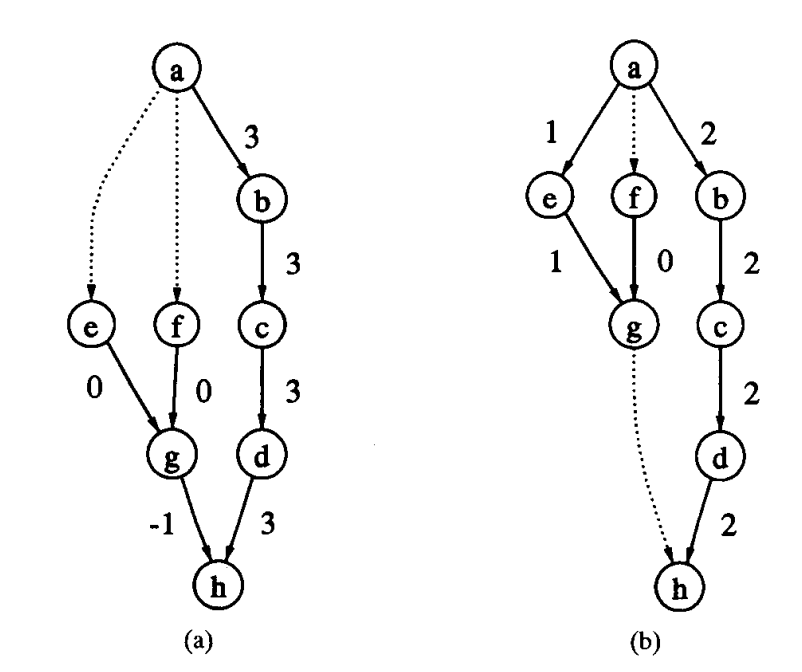
networkSimplex is the best-performing and most expensive ranker algorithm. It is the best because layering with this ranker often achieves the shortest line length. It is the most expensive because it includes the processes of feasibleTree and longestPath, and then iterates on this basis to optimize the lines. Since this ranker performs the best, DAGLayout uses it by default for layering. If your dataset is large, you can try using feasibleTree to reduce this overhead.
feasibleTree
feasibleTree performs layering by constructing a spanning tree. It is a prerequisite step for networkSimplex and can also be used independently for layering. The comparison of the layering effects of the two is shown in the figure below. (a) is the layout effect of feasibleTree, and (b) is networkSimplex.
longestPath
When using the longest path algorithm to calculate node layering, nodes will be assigned to the lowest possible level. The direct consequence is that the bottom levels will be very wide, and the total length of the lines will also be longer, so it is not recommended to use it directly. However, this algorithm executes very quickly and can be scaled well, so it is used as an initialization step for other rankers.
bfs
bfs is a unique ranker in vGraph. We found in actual business scenarios that in some cases, the hierarchy of data has a specific meaning, and the above rankers cannot guarantee that all nodes related to a single node are on the same level to maintain consistent line direction. So we developed the bfs ranker. Users can specify a node, and the n-degree relationships starting from this node will be on the n-th level above/below this node. At the same time, it may also produce lines between nodes at the same level.
custom
custom serves as a supplement to bfs, suitable for scenarios that require expanding nodes layer by layer. Due to the special nature of this layer-by-layer expansion interaction, the level of each node is known during user interaction. Therefore, you can directly set the ranker to custom. DAGLayout will layer the nodes based on the rank on the nodes.
// Prepare for node layering based on node levelgraph.getNodes().forEach(node => {
node.set('rank', rank);
});
const layout = new DAGLayout({
graph,
options: {
...,
rank: 'custom' },
});
Order
Order is used to specify the mutual order of nodes at the same level. The default value of order is minCross. DAGLayout will calculate an order with the fewest line crossings to avoid visual anomalies that convey misleading graph information.
When you need to control the order of nodes at each level in your graph scenario, you can set order to custom. DAGLayout will sort the nodes at the same level based on the order data item on the nodes.
// Sort nodes at the same level based on the node state code `stateCode`graph.getNodes().forEach(node => {
node.set('order', node.stateCode);
});
const layout = new DAGLayout({
graph,
options: {
...,
order: 'custom' },
});