It is not only a fully functional graph visualization library, but also an explorer of data relationships.
!!!###!!!title=Primitive Interaction and State Handling——VisActor/VChart Contributing Documents!!!###!!!!!!###!!!description=---title: 6.3 Interaction and State Management of Primitives key words: VisActor,VChart,VTable,VStrory,VMind,VGrammar,VRender,Visualization,Chart,Data,Table,Graph,Gis,LLM---!!!###!!!
Introduction
VChart instances provide methods related to event listening, allowing you to meet business needs and interact with charts by listening to events. For all events supported by VChart, refer to the documentation event api. You can listen to a specific event on a primitive in the following two ways:
In VChart, primitives can be in several states, and different states can display different styles. The built-in states are:
default default state;
hover / hover_reverse When the mouse hovers over a primitive, it enters the hover state, and other primitives enter the hover_reverse state;
selected / selected_reverse When the mouse clicks on a primitive, it enters the selected state, and other primitives enter the selected_reverse state;
dimension_hover / dimension_hover_reverse Dimension hover state, when the mouse pointer hovers over a certain section of the x axis area, the primitives in the area enter the dimension_hover state, and other primitives enter the dimension_hover_reverse state.
State Definition
The state types are defined in packages/vchart/src/compile/mark/interface.ts for convenient use later:
Notice that there is also a STATE_CUSTOM state, which is a user-defined state. We will introduce the usage of custom states later.
State Style Storage
In order for the graphic elements to display different styles in different states, the structure for storing different state styles is defined in the graphic element interface IMarkRaw:
These styles are defined by the user in spec and stored in stateStyle after parsing.
Interaction and State Switching of Primitives
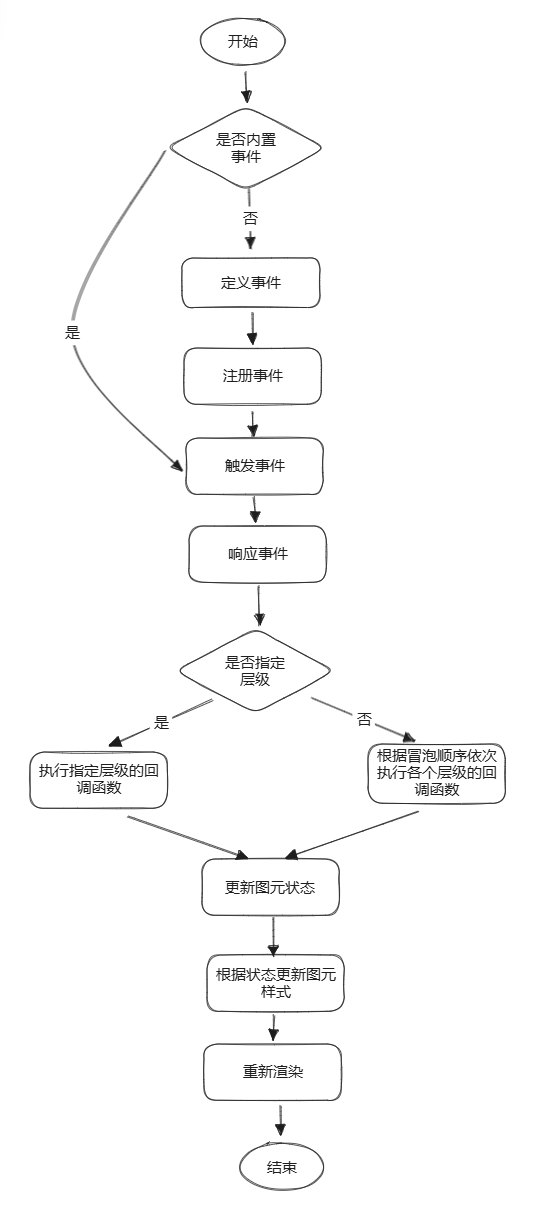
The states and corresponding styles of the primitives have been defined. So, how can we switch the state of the primitives through event interaction and display different styles? The general process is as follows:
Register Event
The entry point for interactive events is the on method of the Event class,
eventType is the type of event, such as pointerdown, dimensionHover, etc.
query is the event filter, such as element name, event level, component type, etc.
callback is the callback function triggered by the event.
This will call the core function register of EventDispatcher:
// vchart/src/event/event-dispatcher.ts
***register***<EvtextendsEventType>(eType: Evt, handler: EventHandler<EventParamsDefinition[Evt]>): this {
// 解析 query 配置并生成最终 handler 内容
this.***_parseQuery***(handler);
// 获取相应的bubble对象
const bubbles = this.***getEventBubble***(handler.filter?.source || Event_Source_Type.chart);
const listeners = this.***getEventListeners***(handler.filter?.source || Event_Source_Type.chart);
if (!bubbles.***get***(eType)) {
bubbles.***set***(eType, new ***Bubble***());
}
// 挂载事件监听
const bubble = bubbles.***get***(eType) as Bubble;
bubble.***addHandler***(handler, handler.filter?.level as EventBubbleLevel);
if (this.***_isValidEvent***(eType) && !listeners.***has***(eType)) {
const ***callback*** = this.***_onDelegate***.***bind***(this);
this._compiler.***addEventListener***(handler.filter?.source as EventSourceType, eType, ***callback***);
listeners.***set***(eType, ***callback***);
} else if (this.***_isInteractionEvent***(eType) && !listeners.***has***(eType)) {
const ***callback*** = this.***_onDelegateInteractionEvent***.***bind***(this);
this._compiler.***addEventListener***(handler.filter?.source as EventSourceType, eType, ***callback***);
listeners.***set***(eType, ***callback***);
}
return this;
}
Parse the event configuration (query) passed by the user and generate the final event filter (filter).
Retrieve the corresponding event Bubble object from the internally maintained Map (such as _viewBubbles) based on the source (chart, window, or canvas) in the filter; if not present, create a new one.
Add the event handler (handler) to the Bubble; if there is no listener for this event type in the corresponding scenario, register a callback for the underlying syntax layer through the compiler (this._compiler.addEventListener).
**Bubble** is used to manage the collection of handlers for the same event at different bubbling levels (such as Mark, Model, Chart, VChart). It categorizes and stores event handlers according to the bubbling level and provides methods to add, remove, allow, or prohibit handlers, thereby achieving orderly invocation and management of events at each level.
##### Response Event

When an interaction event is triggered, another core function `dispatch` of `EventDispatcher` will be called:

```Typescript
  // vchart/src/event/event-dispatcher.ts
  ***dispatch***<Evt extends EventType>(eType: Evt, params: EventParamsDefinition[Evt], level?: EventBubbleLevel): this {
    // 默认事件类别为 view
    const bubble = this.***getEventBubble***((params as BaseEventParams).source || Event_Source_Type.chart).***get***(
      eType
    ) as Bubble;
    // 没有任何监听事件时,bubble 不存在
    if (!bubble) {
      return this;
    }

    // 事件冒泡逻辑:Mark -> Model -> Chart -> VChart
    let stopBubble: boolean = false;

    if (level) {
      // 如果指定了 level,则直接处理,不进行冒泡
      const handlers = bubble.***getHandlers***(level);
      stopBubble = this.***_invoke***(handlers, eType, params);
    } else {
      const levels = [
        Event_Bubble_Level.mark,
        Event_Bubble_Level.model,
        Event_Bubble_Level.chart,
        Event_Bubble_Level.vchart
      ];
      let i = 0;

      // Mark 级别的事件只包含对语法层代理的基础事件
      while (!stopBubble && i < levels.length) {
        stopBubble = this.***_invoke***(bubble.***getHandlers***(levels[i]), eType, params);
        i++;
      }
    }

    return this;
  }
Retrieve the corresponding Bubble Map based on the event source (source: view, window, canvas), and then extract the Bubble corresponding to the event type from it.
If a Bubble is found, obtain the registered handlers (handlers) according to the bubbling hierarchy (Mark→ Model→ Chart→ VChart) and call the _invoke method to execute them.
The _invoke method checks for matches based on the event filter (filter), and if it passes, it calls the callback function; if the callback returns a truthy value, it indicates preventing subsequent bubbling processing.
State Switching
Switch the state of the graphic elements in the mounted callback function. By default, vchart mounts handlers for hover, selected, dimensionHover/dimensionClick events. The first two are implemented and proxied by the VGrammar syntax layer, while events related to dimension are implemented in VChart. Taking hover as an example, first define and register the dimensionHover event:
In simple terms, it involves adding or removing elements under corresponding events, and the specific change in element state is managed and implemented through the Interaction class. For example, in addEventElement, a new graphic element is added to the specified state and the element is marked for that state.
  ***addEventElement***(stateValue: StateValue, element: IElement) {
    if (this._disableTriggerEvent) {
      return;
    }
    if (!element.***getStates***().***includes***(stateValue)) {
      element.***addState***(stateValue); // 改变元素内部图元样式
    }
    const list = this._stateElements.***get***(stateValue) ?? [];
    list.***push***(element);
    this._stateElements.***set***(stateValue, list);
  }
Finally, the element changes the style of the internal graphic elements according to the state through the addState function, which calls the interface of the syntax layer VGrammar.
Custom State and Interaction Example
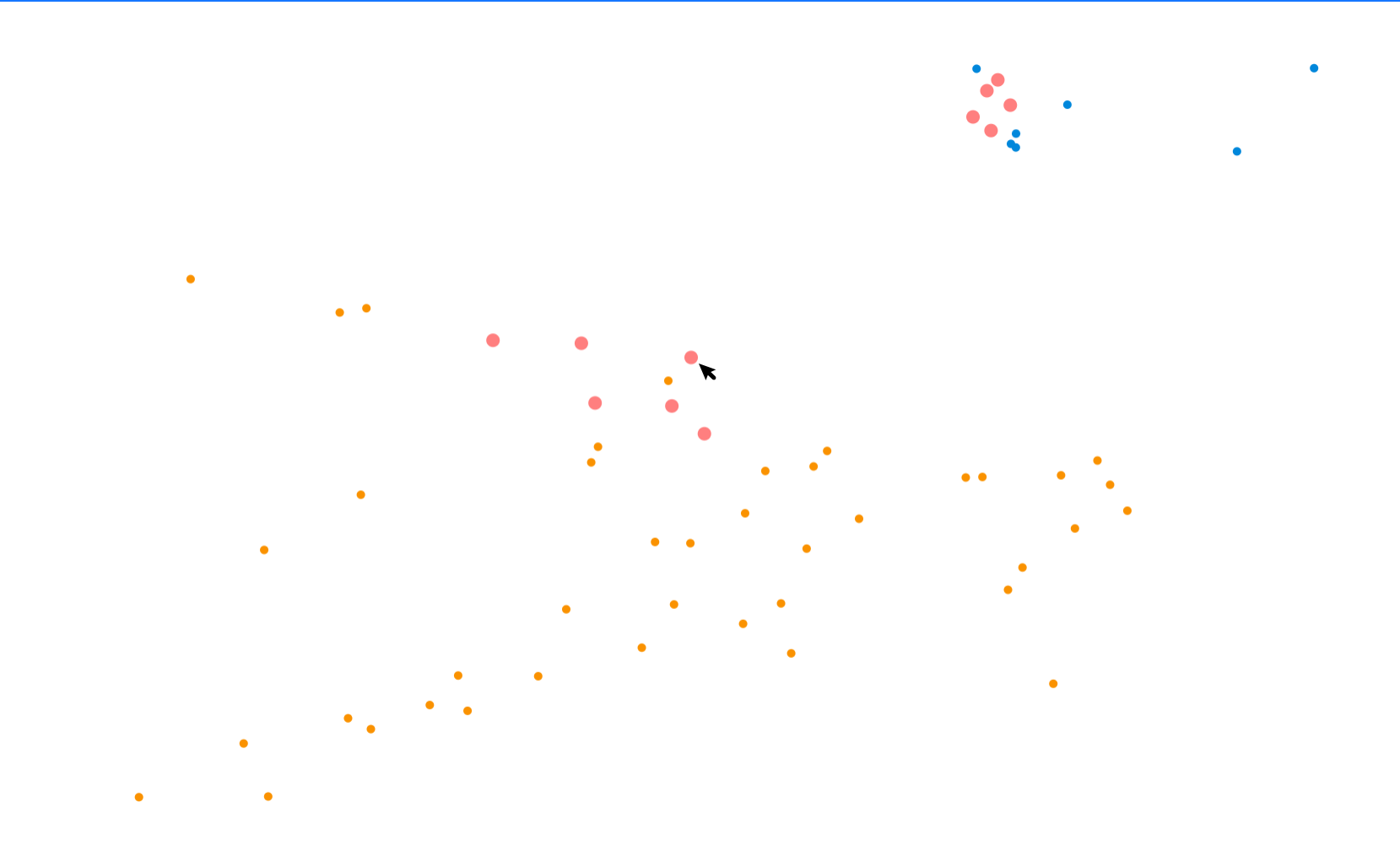
As mentioned above, we can customize some states of the graphic elements, and VChart provides the updateState interface to update states, which allows us to achieve more requirements based on this. For example, we want to highlight the neighboring points in another style when hovering over a point.
First, define a new state as_neighbor for the points in the spec and specify its style:
In this way, the state of the neighboring point is set to as_neighbor, and through the above process, the specified style is finally displayed (enlarged to 2 times, 0.5 transparency, and turned red):
This document was revised and organized by the following person