react-vchart is the React wrapper version of VChart, mainly providing two styles of components externally:
<VChart /> and <VChartSimple />
<LineChart /> and other semantic tags
Their differences are as follows:
Applicable Scenarios:
<VChart />: A large and comprehensive unified entry tag that encapsulates chart specifications, providing standardized update and unload logic. Suitable for toB pages, product pages with page building, and business parties migrating with self-encapsulated VChart.
Semantic tags: Suitable for simple pages, where developers write code manually, making it easy to implement unpacking and on-demand loading.
Usage:
<VChart />: Receives a complete spec as the chart definition. When using, introduce the VChart component and pass in spec and other related attributes. For example:
Syntax tags: Encapsulate the chart container and each component as React components for export. Choose the corresponding chart tag according to the chart type when using, and then match it with the appropriate component tags and series tags. For example, to create a bar chart: \r\n\r
Through the above code examples, the differences in usage between the two components can be understood more intuitively.
Core Code Implementation
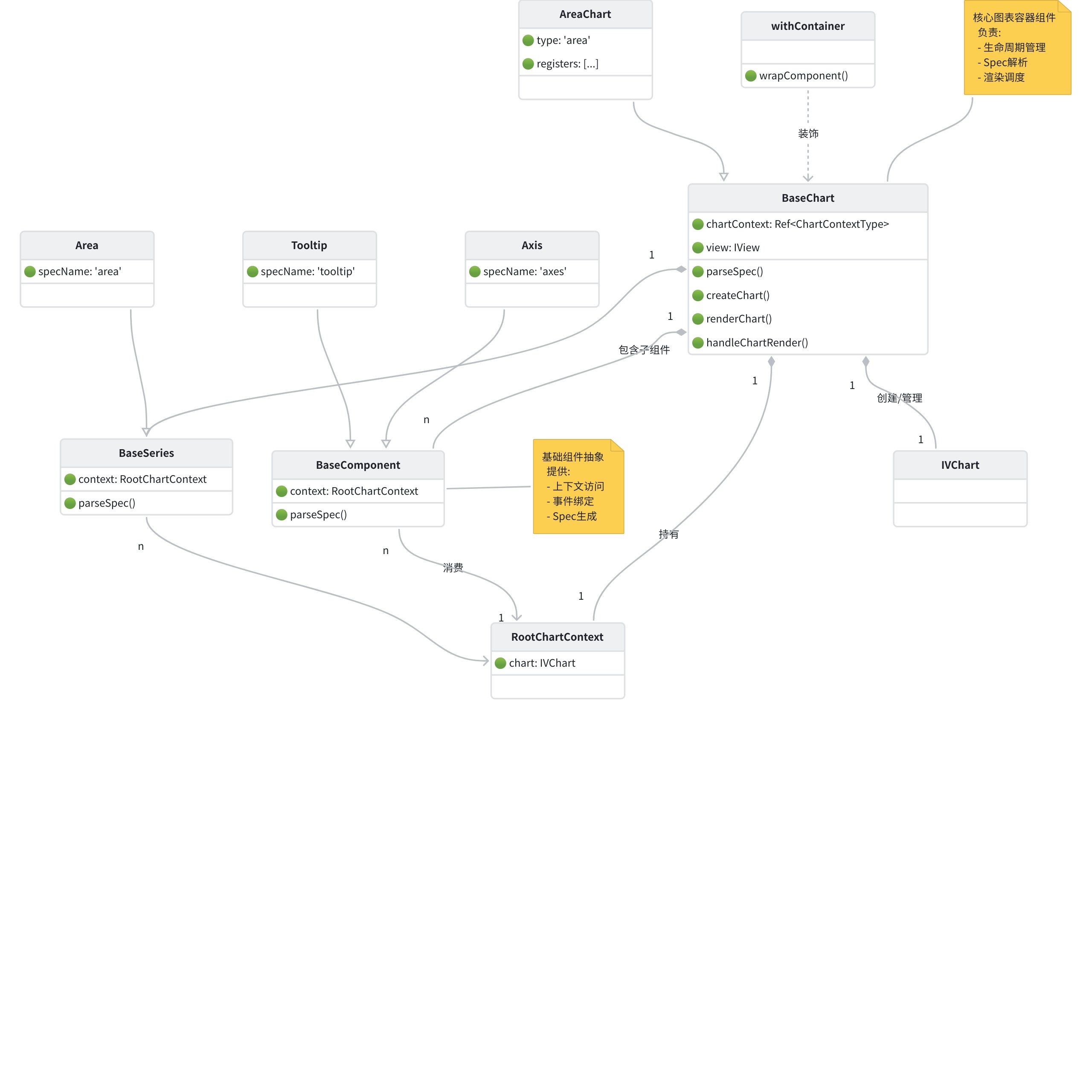
From the implementation perspective, the encapsulation principles of <VChart /> and <LineChart /> do not differ much. Firstly, all Chart components are encapsulated based on BaseChart, with the core code in the following files: