!!!###!!!title=Taro VChart Introduction——VisActor/VChart Contributing Documents!!!###!!!!!!###!!!description=---title: 14.2.1 Taro-VChart Introduction key words: VisActor,VChart,VTable,VStrory,VMind,VGrammar,VRender,Visualization,Chart,Data,Table,Graph,Gis,LLM---!!!###!!!

Overview

taro-vchart is the Taro mini program encapsulation version of VChart, providing an encapsulation of the VChart React version in the Taro environment.

  • For more information about the Taro mini program host environment, please refer to the official documentation: https://docs.taro.zone/docs/

Core Code Structure

taro-vchart's directory and architecture correspond to:

  • Chart Factory Layer: charts directory

Using the factory pattern to uniformly generate chart components (such as BoxPlotChart), which includes all available chart type components. Each chart is created through the createChart method with standardized parameters:

export const Chart = createChart<ISpec>(
  'ChartName',
  { chartConstructor: VChart }, // 核心图表构造器
  [registerModules] // 按需注册的图表模块
);    

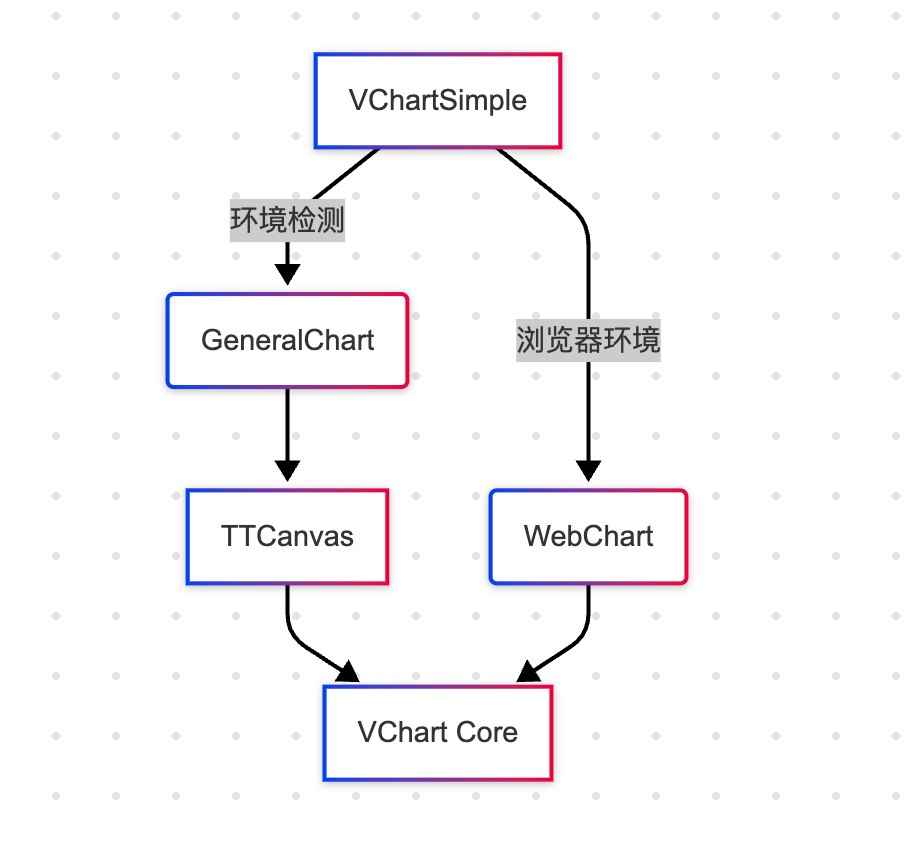
  • Cross-platform adaptation layer: The components directory implements the core logic for cross-platform rendering, including a general chart component and a browser chart component, with consistent functionality mainly to address different platforms.

  • General chart component general-chart/index.tsx

export class GeneralChart extends React.Component<GeneralChartProps> {
  // 小程序专用生命周期
  async componentDidMount() {
    // 通过循环最多尝试100次获取DOM节点(解决飞书小程序异步问题)
    for (let i = 0; i < MAX_TIMES; i++) {
      const domref = await getDomRef();
      this.init({ domref });
    }
  }

  // 小程序专用渲染结构
  render() {
    return (
      <View>
        <Canvas id="tooltip"/> {/* 交互事件画布 */}
        <Canvas id="draw"/>    {/* 主渲染画布 */}
        <Canvas id="hidden"/> {/* 辅助画布 */}
      </View>
    )
  }
}    

  • Browser chart component web-chart/index.tsx
export class WebChart extends React.Component<WebChartProps> {
  // 标准浏览器生命周期
  componentDidMount() {
    this.vchart = new chartConstructor(spec, {
      dom: canvasId // 直接使用DOM容器
    });
  }

  // 简单DOM结构
  render() {
    return <div id={canvasId}/> // 单容器方案
  }
}    

The cross-platform adaptation architecture is shown in the figure below:

Taro is a framework that can run in various mini-program environments. When using GeneralChart, you can pass in different environments to adapt:

const strategies = {
  lark: () => <GeneralChart mode="miniApp"/>,
  tt: () => <GeneralChart mode="tt"/>,
  weapp: () => <GeneralChart mode="wx"/>,
  web: () => <WebChart />,
  h5: () => <WebChart mode="mobile-browser"/>
};    

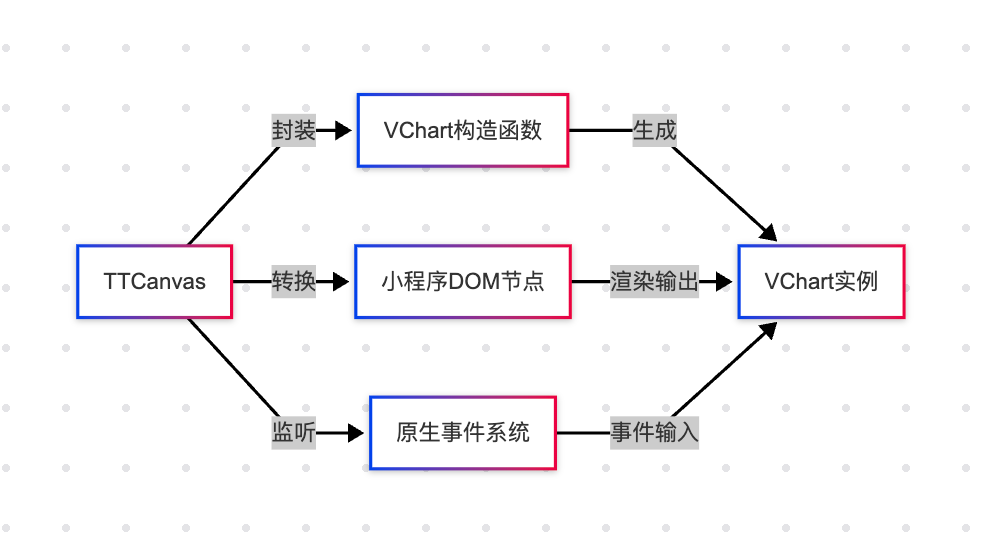
TTCanvas is responsible for managing specific VChart instances, receiving props passed by GeneralChart, and implements the chart capabilities for seamless integration into the mini-program ecosystem through an abstract general interface.

In the following chapters, we will analyze the encapsulation of the WX-VChart component in detail.

This document was revised and organized by the following person

玄魂