


1. Core Mechanism
As mentioned earlier, openinula-vchart provides two ways to declare components.
-
Unified entry components, such as:
<VChart />and<VChartSimple /> -
Semantic chart components, including:
-
Charts, such as:
<LineChart /><BarChart />etc. -
Series, such as
<Line /><Bar />etc. -
Controls, such as
<legend /><Axes />etc.
The following diagram shows the implementation mechanism of openinula-vchart:
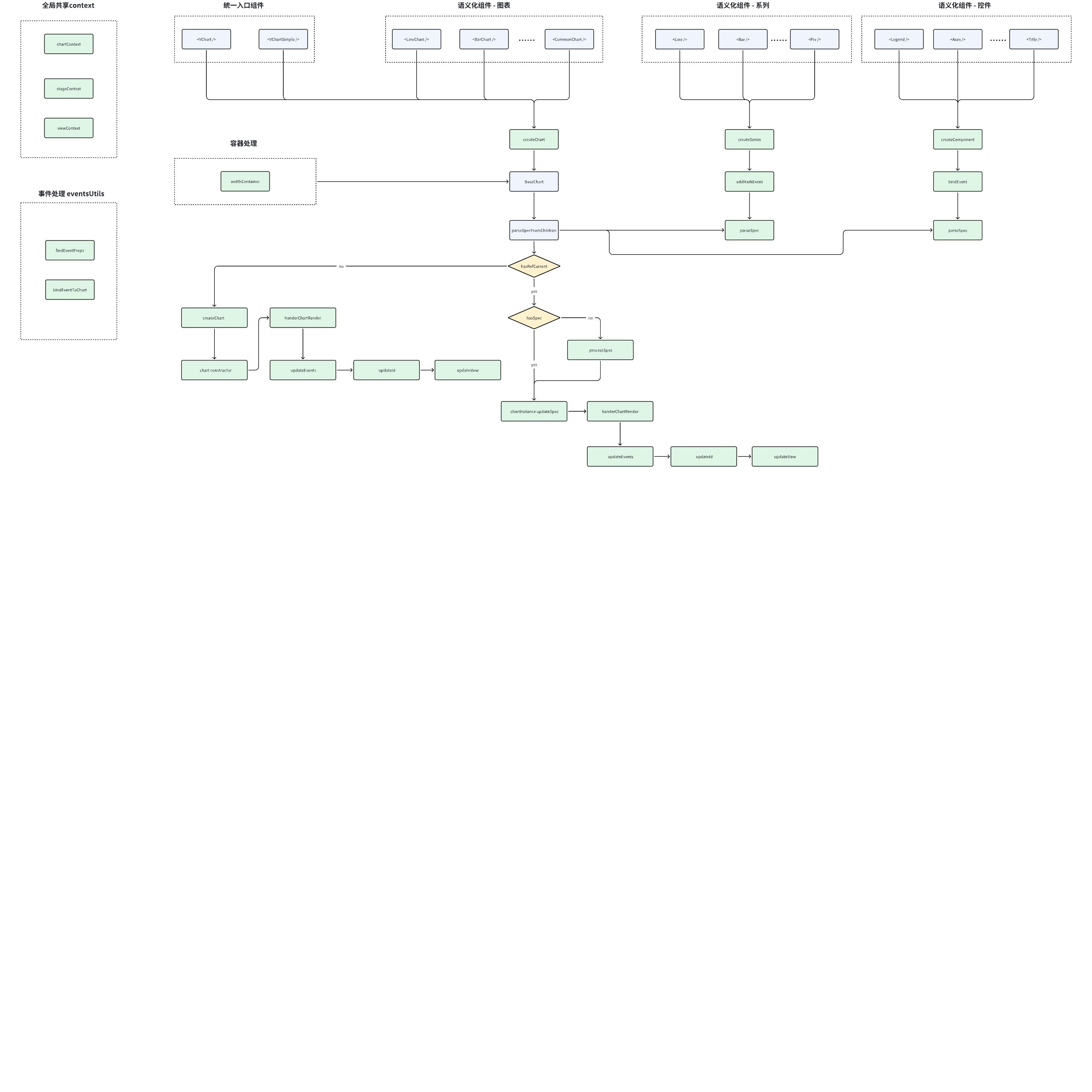
Next, let's introduce the specific implementation of different modules:
II. Chart
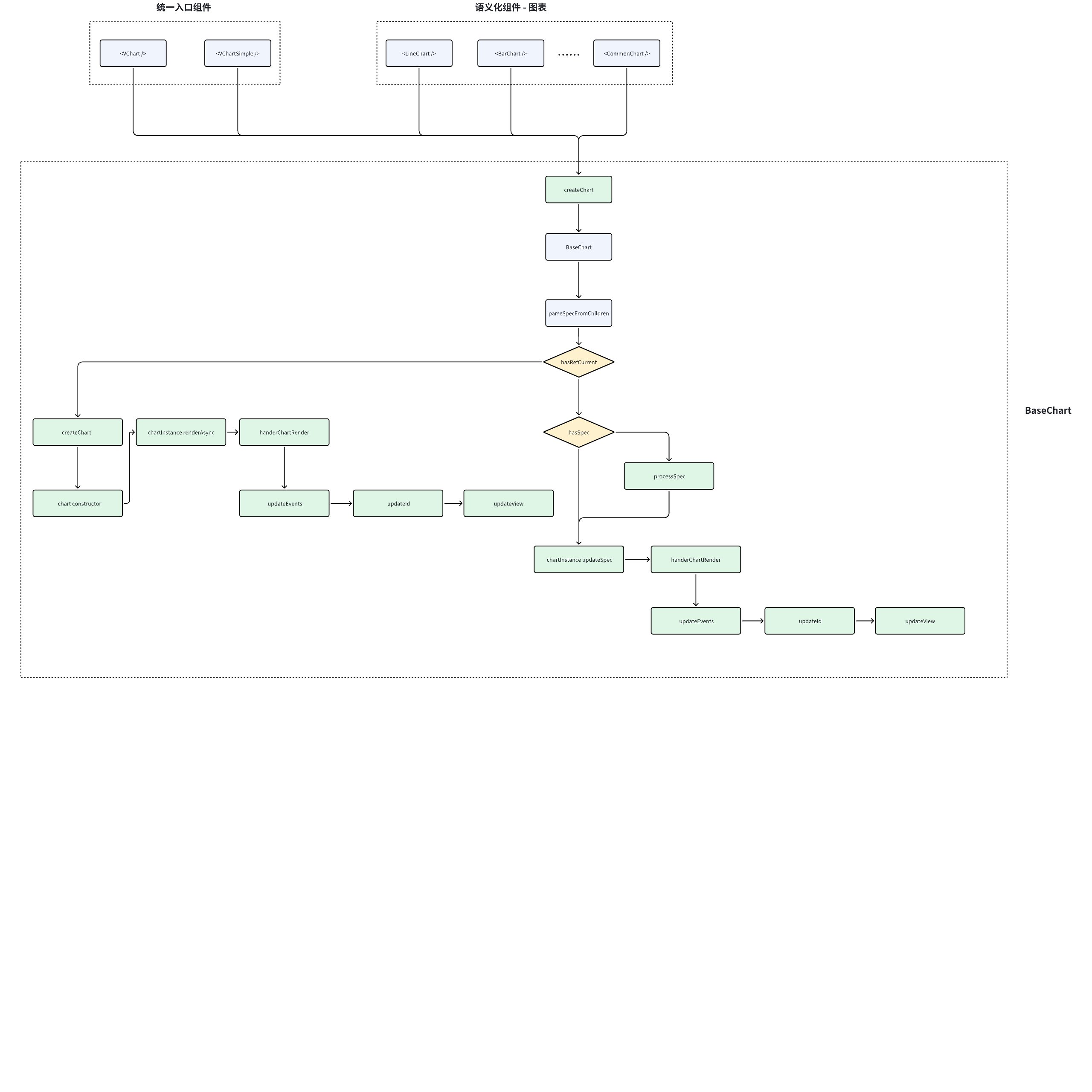
Component Entry
packages/openinula-vchart/src/VChart.tsx
packages/openinula-vchart/src/VChartSimple.tsx
packages/openinula-vchart/src/charts
Whether it is a unified entry component or a semantic component, it will go into the createChart logic. createChart creates different charts based on different parameters.
Take <VChart /> as an example, this component does only one thing, which is createChart:
import { BaseChartProps, createChart } from './charts/BaseChart';
import VChartCore from '@visactor/vchart';
export { VChartCore };

// 定义 VChart 组件属性,排除基础图表中不需要的 props
export type VChartProps = Omit<BaseChartProps, 'container' | 'data' | 'width' | 'height' | 'type'>;

// 创建 VChart 组件实例
export const VChart = createChart<VChartProps>('VChart', {
  vchartConstrouctor: VChartCore // 构造器: VChart 核心库
});
Create Chart Container
packages/openinula-vchart/src/charts/BaseChart.tsx
export const createChart = <T extends Props>(
  componentName: string, // 组件名称, 用于配置class等
  defaultProps?: Partial<T>, // 组件属性,用于创建vchart实例、解析spec、挂载event等
  callback?: (props: T, defaultProps?: Partial<T>) => T // 回调,用于处理props
) => {
  // 基于BaseChart封装容器,并设置css属性、挂在ref等
  const Com = withContainer<ContainerProps, T>(BaseChart as any, componentName, (props: T) => {
    // 自定义属性处理
    if (callback) {
      return callback(props, defaultProps);
    }

    // 如果有默认属性,则将组件属性与默认属性合并
    if (defaultProps) {
      return Object.assign(props, defaultProps);
    }

    // 直接返回属性
    return props;
  });
  // 设置组件识别标志
  Com.displayName = componentName;
  return Com;
};
This step mainly involves the following based on the passed component name, component properties, and callbacks:
-
Container encapsulation: Encapsulated based on
**BaseChart**, during which CSS properties are set, refs are mounted, etc. -
Props handling: If there are custom property handling or default properties, perform custom handling or merge default properties
-
displayName: Set the component identification flag for React debugging
BaseChart Chart Base Class
packages/openinula-vchart/src/charts/BaseChart.tsx
State Management
// 状态管理
const [updateId, setUpdateId] = useState<number>(0); // 图表更新计数器
const chartContext = useRef<ChartContextType>({}); // 图表上下文引用
useImperativeHandle(ref, () => chartContext.current?.chart); // 对外暴露图表实例
const hasSpec = !!props.spec; // 是否存在全量 spec 配置

// 视图与生命周期
const [view, setView] = useState<IView>(null); // 底层 VGrammar 视图实例
const isUnmount = useRef<boolean>(false); // 组件卸载标记

// 配置缓存
const prevSpec = useRef(pickWithout(props, notSpecKeys)); // 过滤非 spec 属性后的配置
const specFromChildren = useRef<Omit<ISpec, 'type' | 'data' | 'width' | 'height'>>(null); // 子组件生成的 spec

// 事件系统
const eventsBinded = React.useRef<BaseChartProps>(null); // 已绑定的事件属性缓存

// 性能优化
const skipFunctionDiff = !!props.skipFunctionDiff; // 是否跳过函数对比

// tooltip节点
const [tooltipNode, setTooltipNode] = useState<ReactNode>(null); // 自定义 tooltip 节点
Two core designs:
-
Differential comparison optimization: Achieve precise configuration change detection through prevSpec and pickWithout
-
Dual update mode: Distinguish between full spec updates and declarative component updates based on the hasSpec variable
Subcomponent spec analysis
const parseSpecFromChildren = (props: Props) => {
  // 初始化空 spec 对象(排除 type/data/width/height 字段)
  const specFromChildren: Omit<ISpec, 'type' | 'data' | 'width' | 'height'> = {};

  // 将子组件转换为数组并遍历
  toArray(props.children).map((child, index) => {
    // 获取子组件的 parseSpec 方法(需组件实现)
    const parseSpec = child && (child as any).type && (child as any).type.parseSpec;

    if (parseSpec && (child as any).props) {
      // 生成子组件 props:自动添加 componentId
      const childProps = isNil((child as any).props.componentId)
        ? {
            ...(child as any).props,
            componentId: getComponentId(child, index) // 生成唯一组件ID
          }
        : (child as any).props;

      // 调用子组件的规范解析方法
      const specResult = parseSpec(childProps);

      // 合并解析结果到总 spec
      if (specResult.isSingle) {
        // 单例模式(如标题组件)
        specFromChildren[specResult.specName] = specResult.spec;
      } else {
        // 多例模式(如多个数据标记)
        if (!specFromChildren[specResult.specName]) {
          specFromChildren[specResult.specName] = [];
        }
        specFromChildren[specResult.specName].push(specResult.spec);
      }
    }
  });

  return specFromChildren;
};
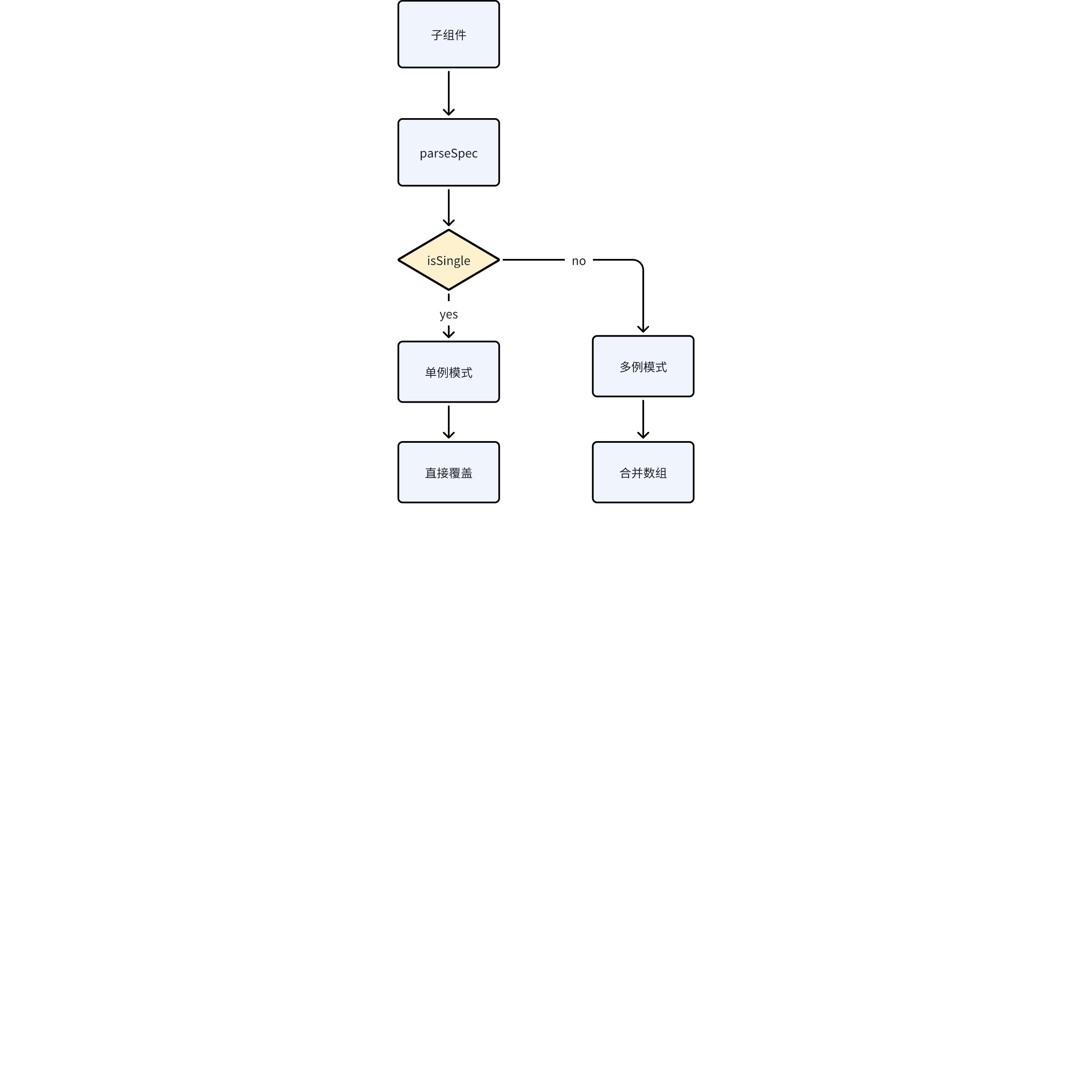
The main task of this module is to parse the spec from subcomponents and mount it onto specFromChildren. Due to different component configuration modes, some are singleton and some are multiple instances, so the parsing logic is slightly different.
Key content of this module:
- Declarative Component Transformation:
Transform JSX declarations like this:
<LineChart>
  <Mark type="point" />
  <Axis orient="bottom" />
</LineChart>
Convert to VChart standard JSON spec:
{
  "mark": [{ "type": "point" }],
  "axes": [{ "orient": "bottom" }]
}
- Component Unique Identifier:
The ID generated by getComponentId is structured as ComponentType-Index (e.g., Mark-0), used for:
-
Precise component update tracking
-
Avoiding duplicate component conflicts
-
Component identification during debugging
- Dual-mode spec merge strategy:
Typical Subcomponent Implementation
Take the Marker component as an example:
// 实现 parseSpec 方法
class MarkPoint extends BaseComponent {
  static parseSpec(props: MarkProps) {
    return {
      specName: 'markPoint',  // 对应 spec 中的字段名
      isSingle: false,   // 允许多个 MarkPoint 组件
      spec: {
        type: props.type,
        style: props.style
      }
    };
  }
}
Create Chart
const createChart = (props: Props) => {
  // 1. 实例化图表(利用传入的图表构造器)
  const cs = new props.vchartConstrouctor(
    parseSpec(props), // 合并后的图表spec
    {
      ...props.options, // 透传图表配置
      onError: props.onError, // 异常处理回调
      autoFit: true,    // 开启自动尺寸适配
      dom: props.container // 绑定 DOM 容器
    }
  );

  // 2. 更新上下文引用
  chartContext.current = { ...chartContext.current, chart: cs };

  // 3. 重置卸载标记
  isUnmount.current = false;
};
spec analysis
const parseSpec = (props: Props) => {
  // 决策逻辑:优先使用全量 spec 配置
  let spec: ISpec = undefined;

  // 全量 spec 模式(直接使用传入的 spec)
  if (hasSpec && props.spec) {
    spec = props.spec;
  }
  // 声明式组件模式(合并 props 和子组件生成的 spec)
  else {
    spec = {
      ...prevSpec.current,         // 来自组件 props 的配置
      ...specFromChildren.current  // 来自子组件解析的配置
    } as ISpec;
  }

  // 自定义 tooltip 处理(React 组件与 VChart 的桥接)
  const tooltipSpec = initCustomTooltip(setTooltipNode, props, spec.tooltip);
  if (tooltipSpec) {
    spec.tooltip = tooltipSpec; // 覆盖默认 tooltip 配置
  }

  return spec;
};
Render Charts
  const renderChart = () => {
    if (chartContext.current.chart) {
      chartContext.current.chart.renderSync({
        reuse: false
      });
      handleChartRender();
    }
  };
Get the mounted instance through the chartContext and call the instance's renderSync method to render the chart.
Event Binding & Context Update
const handleChartRender = () => {
  // 1. 安全检查:确保组件未卸载且图表实例存在
  if (!isUnmount.current) {
    if (!chartContext.current || !chartContext.current.chart) {
      return;
    }

    // 2. 事件系统:重新绑定所有图表事件
    bindEventsToChart(chartContext.current.chart, props, eventsBinded.current, CHART_EVENTS);

    // 3. 获取底层视图实例
    const newView = chartContext.current.chart.getCompiler().getVGrammarView();

    // 4. 状态更新:触发子组件重渲染
    setUpdateId(updateId + 1);

    // 5. 生命周期回调:通知父组件渲染完成
    if (props.onReady) {
      props.onReady(chartContext.current.chart, updateId === 0); // 区分首次渲染
    }

    // 6. 更新视图上下文
    setView(newView);
  }
};
This section mainly executes the processing logic after the chart rendering is completed, mainly implementing:
- Event Update:
Dynamic update of event listeners is achieved through bindEventsToChart, using a differential comparison strategy to avoid duplicate bindings.
It is particularly important to remount events after the chart is re-rendered (such as data updates) to ensure the correctness of interactive responses.
- Bidirectional State Synchronization
Trigger child component updates through setUpdateId (using the key value change mechanism), while storing the VGrammar view instance in the React context to achieve state synchronization between the Canvas layer and the React component layer. The judgment of updateId === 0 distinguishes the first rendering.
- Lifecycle Notification
Achieve parent-child communication in a layered architecture through the onReady callback. After the underlying chart completes the rendering pipeline (layout, drawing, animation), notify the business layer to perform subsequent operations (such as data fetching, associated interactions, etc.).
Three, Series
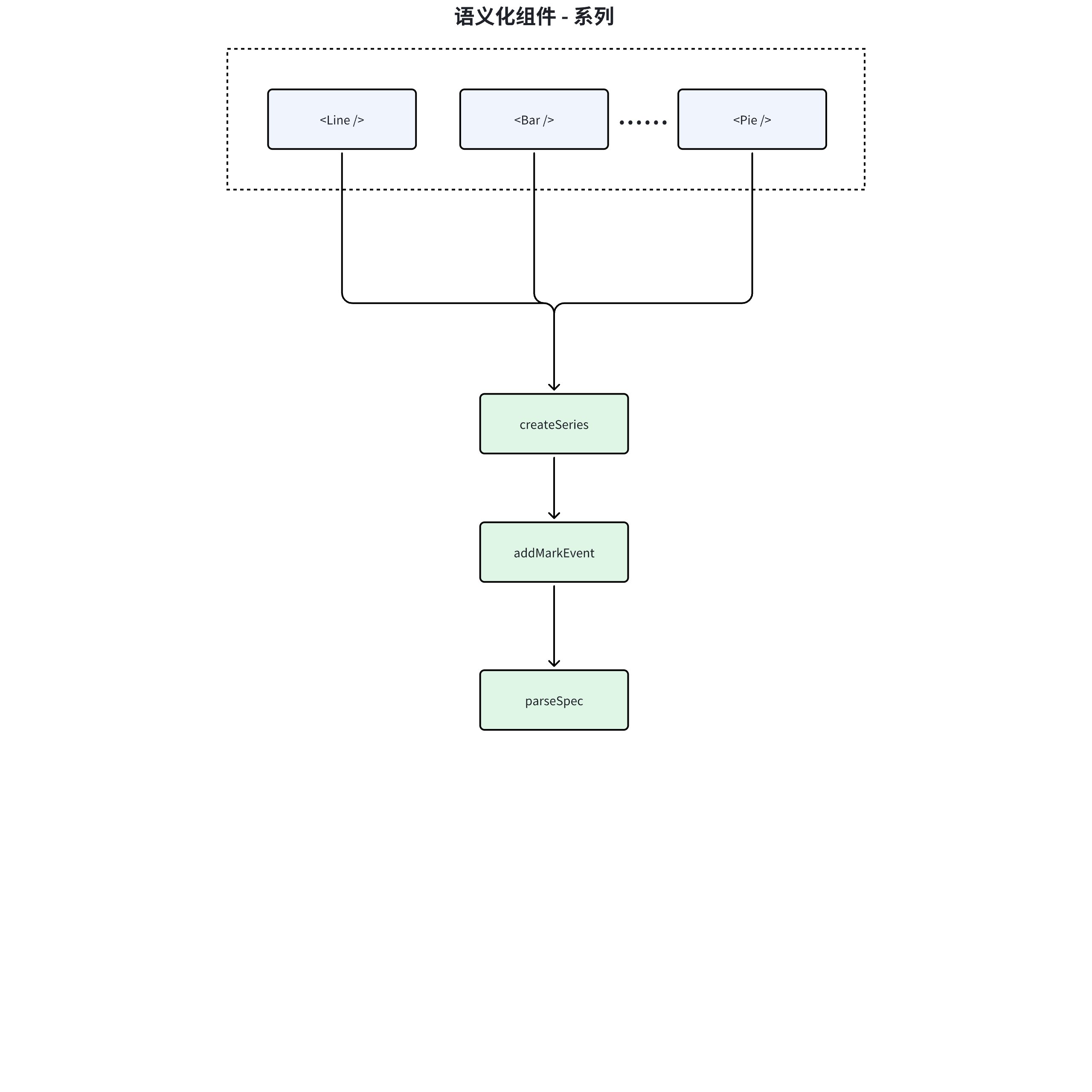
Event Binding
const addMarkEvent = (events: EventsProps) => {
  // 1. 安全校验:确保事件对象和图表实例存在
  if (!events || !context.chart) {
    return;
  }

  // 2. 清理旧事件:遍历解除所有已绑定的事件监听
  if (bindedEvents.current) {
    Object.keys(bindedEvents.current).forEach(eventKey => {
      context.chart.off(REACT_TO_VCHART_EVENTS[eventKey], bindedEvents.current[eventKey]);
      bindedEvents.current[eventKey] = null; // 清除引用
    });
  }

  // 3. 绑定新事件:动态建立 React 事件到 VChart 的映射关系
  events &&
    Object.keys(events).forEach(eventKey => {
      if (!bindedEvents.current?.[eventKey]) {
        // 通过事件类型映射表转换事件名
        context.chart.on(REACT_TO_VCHART_EVENTS[eventKey], handleEvent);

        // 更新绑定记录
        if (!bindedEvents.current) {
          bindedEvents.current = {};
        }
        bindedEvents.current[eventKey] = handleEvent;
      }
    });
};
-
Input Check: The function receives events as a parameter. If events is empty or context.chart does not exist, the function will return immediately without further operations.
-
Unbind Old Events:
If bindedEvents.current exists, it means events have been bound before. At this point, each event in bindedEvents.current will be iterated over, and these events will be unbound using the context.chart.off method, setting the value of the corresponding event key in bindedEvents.current to null.
- Bind New Events:
If events exist, each event in events will be iterated over.
For events that do not exist in bindedEvents.current, i.e., the event context, the handleEvent will be bound to the corresponding event using the context.chart.on method, and the context will be updated.
Event Clearing
const removeMarkEvent = () => {
  addMarkEvent({});
};
When the component is uninstalled, the events will be cleared
spec analysis
  (Comp as any).parseSpec = (compProps: T & { updateId?: number; componentId?: string }) => {
    // 从组件属性中移除不需要的键,生成新的系列规范
    const newSeriesSpec = pickWithout<T>(compProps, notSpecKeys);

    // 为每个标记添加默认的 ID
    addMarkId(newSeriesSpec, compProps.id ?? compProps.componentId);

    // 如果提供了 type 参数,则将其添加到spec中
    if (!isNil(type)) {
      (newSeriesSpec as any).type = type;
    }

    // 返回包含系列规范和规范名称的对象
    return {
      spec: newSeriesSpec,
      specName: 'series'
    };
  };
series is a declarative component, and parseSpec will be called by the parent component to parse and add it to the overall spec.
In series, the main functions of parseSpec are:
-
Filter out unnecessary attributes to generate a new series specification.
-
Add a default ID for each mark.
-
If a type parameter is provided, add it to the series specification.
-
Return an object containing the series specification and specification name.
Four, Component
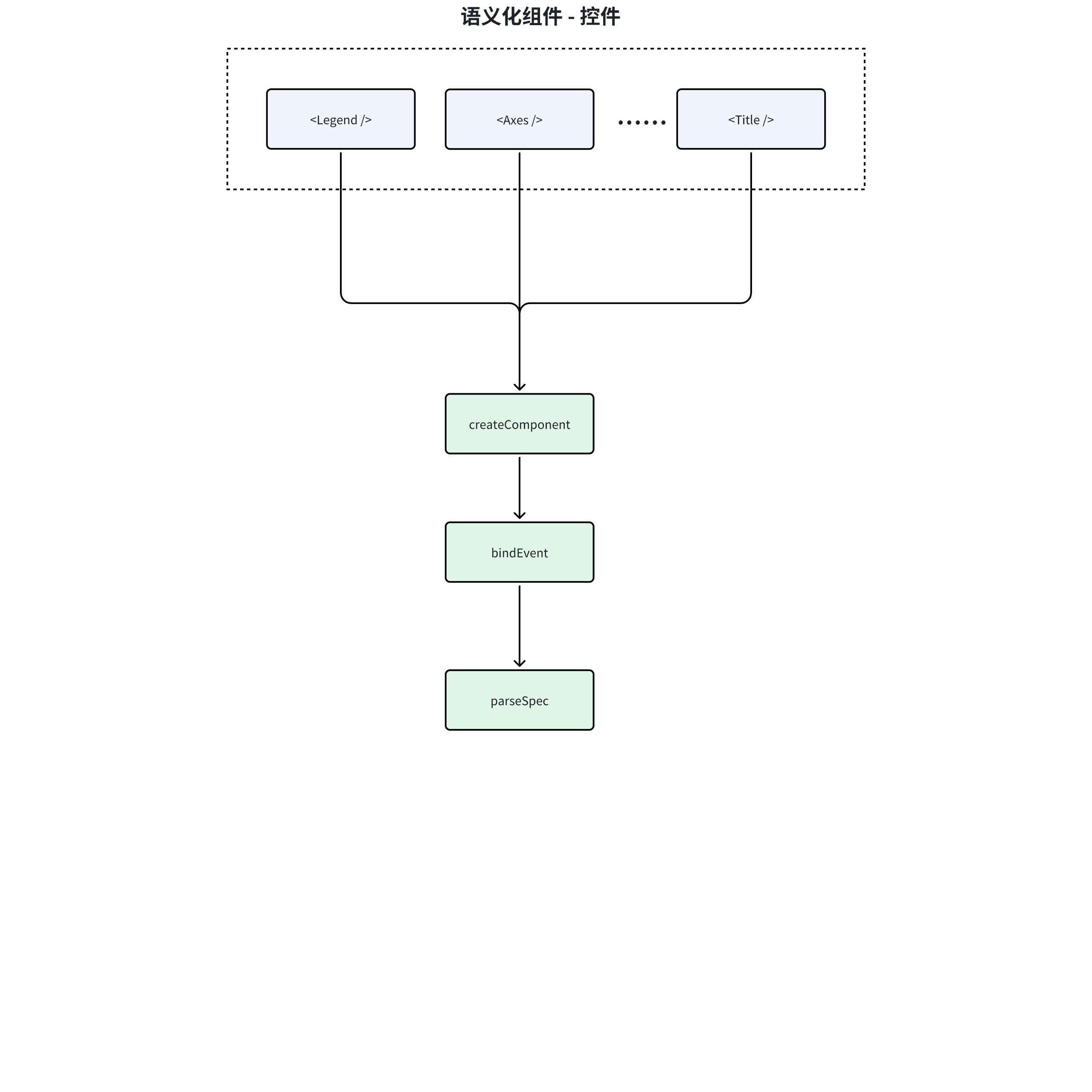
Event Binding
// 检查是否需要更新(通过 updateId 变化检测)
if (props.updateId !== updateId.current) {
  // 更新当前记录的版本号,保持与父组件同步
  updateId.current = props.updateId;

  // 重新绑定图表事件(仅当组件支持事件时执行)
  const hasPrevEventsBinded = supportedEvents
    ? bindEventsToChart( // 调用事件绑定工具方法
        context.chart,        // 从上下文获取图表实例
        props,                // 当前组件属性(含新事件处理器)
        eventsBinded.current, // 之前绑定的事件缓存
        supportedEvents      // 该组件支持的事件类型映射
      )
    : false;

  // 如果事件绑定成功,更新事件缓存引用
  if (hasPrevEventsBinded) {
    eventsBinded.current = props; // 保存当前事件配置用于下次差异比较
  }
}
- Update Detection:
Determine whether the component needs to be updated by checking if props.updateId !== updateId.current. The updateId is an update identifier from the parent component (usually a chart) used to trigger the update process of the child component.
- Event Rebinding
When an update is detected, call the bindEventsToChart method to rebind events. Here, a conditional check is used:
-
If the component supports events (supportedEvents exists), perform event binding
-
After successful binding, update the eventsBinded cache to record the currently bound event properties
-
State Synchronization - Update updateId.current to the latest value to ensure the accuracy of subsequent update detections.
spec Parsing
  (Comp as any).parseSpec = (props: T & { updateId?: number; componentId?: string }) => {
    // 使用 pickWithout 函数从 props 中移除 notSpecKeys 中指定的键,得到新的组件配置
    const newComponentSpec: Partial<T> = pickWithout<T>(props, notSpecKeys);

    // 返回一个包含新组件配置、specName 和 isSingle 的对象
    return {
      spec: newComponentSpec,
      specName,
      isSingle
    };
  };
-
specName is used to determine the mounted specKey
-
isSingle flag is used by the parent component to determine if it is a singleton when parsing the spec
Five, Event Handling
packages/openinula-vchart/src/eventsUtils.ts
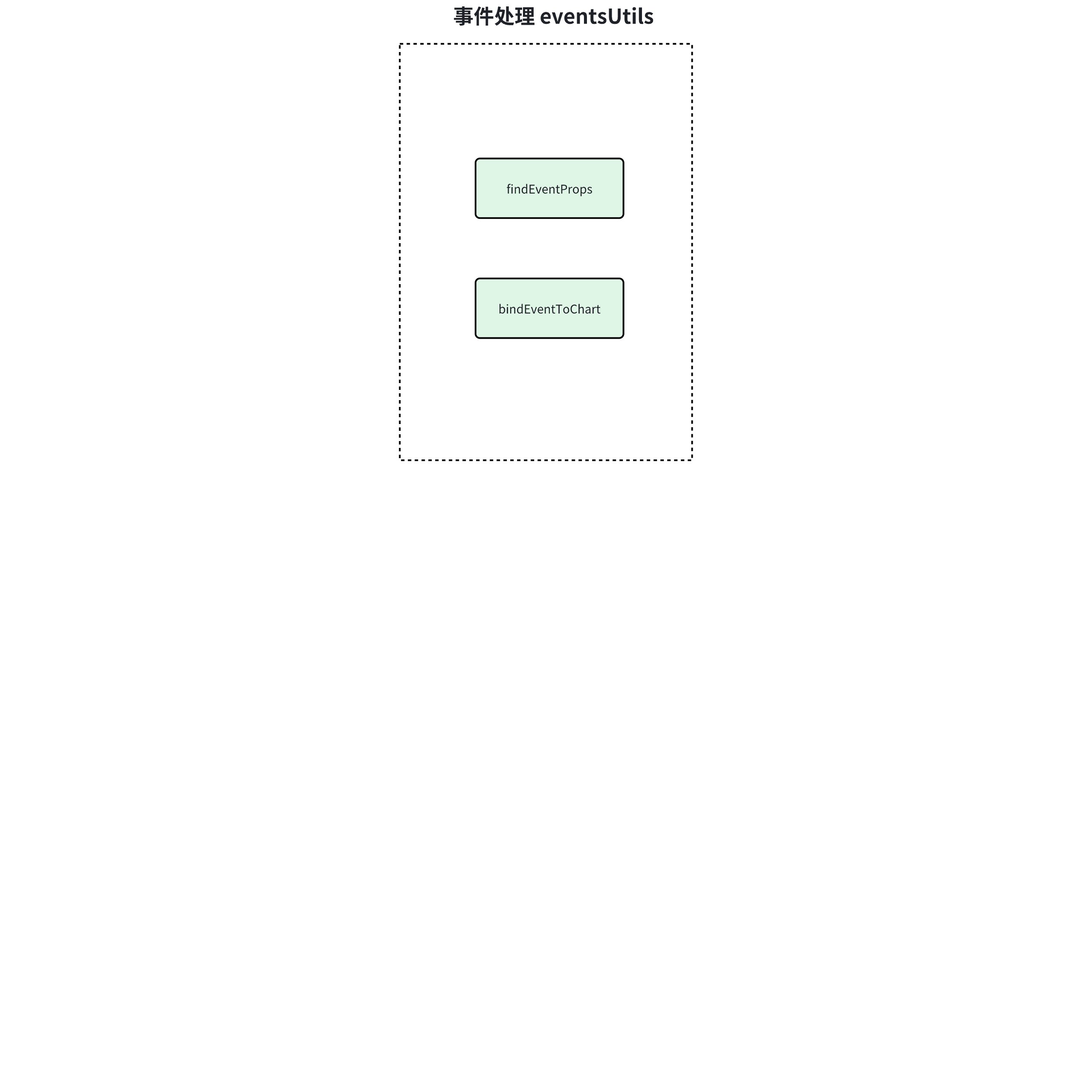
Event Extraction
// 泛型方法:从组件属性中提取有效事件配置
export const findEventProps = <T extends EventsProps>(
  props: T, // 组件属性集合
  supportedEvents: Record<string, string> = REACT_TO_VCHART_EVENTS // 允许的事件映射表
): EventsProps => {
  const result: EventsProps = {}; // 存储过滤后的事件配置

  // 遍历所有属性键
  Object.keys(props).forEach(key => {
    // 双重校验:1. 是否为支持的事件类型 2. 是否存在有效回调函数
    if (supportedEvents[key] && props[key]) {
      result[key] = props[key]; // 收集符合条件的事件处理器
    }
  });

  return result; // 返回纯净的事件配置对象
};
Binding Events
export const bindEventsToChart = <T>(
  chart: IVChart,  // 图表实例
  newProps?: T | null,  // 新事件属性
  prevProps?: T | null,  // 旧事件属性
  supportedEvents: Record<string, string> = REACT_TO_VCHART_EVENTS // 事件映射表
) => {
  // 安全检查:排除无效调用
  if ((!newProps && !prevProps) || !chart) {
    return false;
  }

  // 新旧事件属性过滤(通过之前分析的 findEventProps 方法)
  const prevEventProps = prevProps ? findEventProps(prevProps, supportedEvents) : null;
  const newEventProps = newProps ? findEventProps(newProps, supportedEvents) : null;

  // 解绑阶段:清理过期事件监听
  if (prevEventProps) {
    Object.keys(prevEventProps).forEach(eventKey => {
      // 差异判断:新属性不存在该事件 或 事件处理器发生变化
      if (!newEventProps || !newEventProps[eventKey] || newEventProps[eventKey] !== prevEventProps[eventKey]) {
        chart.off(supportedEvents[eventKey], prevProps[eventKey]); // 解除旧监听
      }
    });
  }

  // 绑定阶段:注册新事件监听
  if (newEventProps) {
    Object.keys(newEventProps).forEach(eventKey => {
      // 差异判断:旧属性不存在该事件 或 事件处理器发生变化
      if (!prevEventProps || !prevEventProps[eventKey] || prevEventProps[eventKey] !== newEventProps[eventKey]) {
        chart.on(supportedEvents[eventKey], newEventProps[eventKey]); // 注册新监听
      }
    });
  }

  return true; // 标识操作完成
};
Six, Global Communication
packages/openinula-vchart/src/context
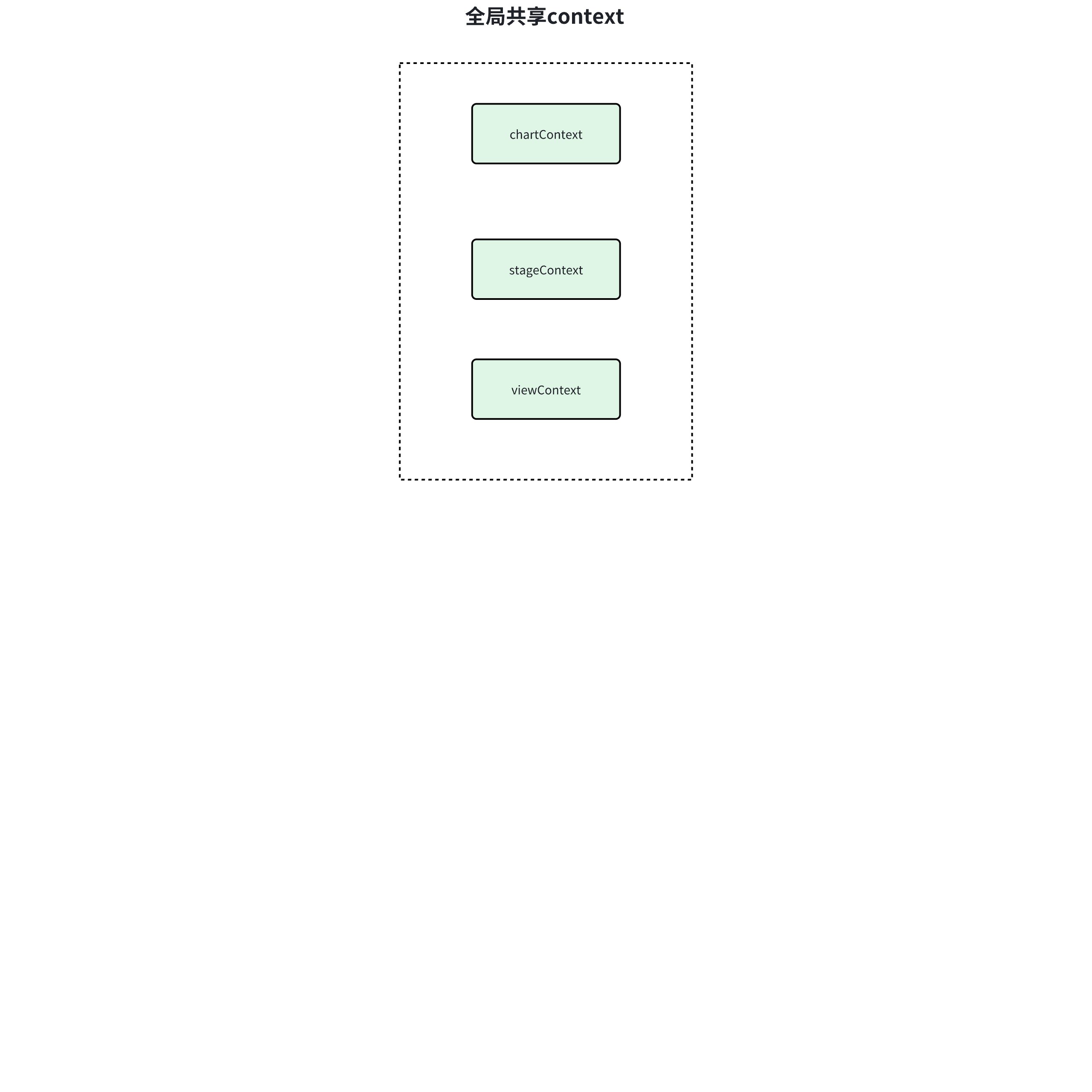
chartContext
export function withChartInstance<T>(Component: typeof React.Component) {
  // 1. 创建转发引用组件
  const Com = React.forwardRef<any, T>((props: T, ref) => {
    // 2. 消费图表上下文
    return (
      <ChartContext.Consumer>
        {(ctx: ChartContextType) =>
          // 3. 注入图表实例到被包裹组件
          <Component
            ref={ref}          // 透传ref
            chart={ctx.chart}  // 注入图表实例
            {...props}         // 透传所有props
          />
        }
      </ChartContext.Consumer>
    );
  });

  // 增强调试信息
  Com.displayName = Component.name;
  return Com;
}
This context is mainly used to share the VChart instance:
Use ChartContext.Consumer to obtain the chart instance from the context and inject it into the target component as a prop, allowing the wrapped component to directly access this.props.chart to obtain the chart instance.
viewContext
export function withView<T>(Component: typeof React.Component) {
  // 1. 创建带ref转发的组件
  const Com = React.forwardRef<any, T>((props: T, ref) => {
    // 2. 消费视图上下文
    return (
      <ViewContext.Consumer>
        {/* 3. 注入视图实例到被包裹组件 */}
        {ctx =>
          <Component
            ref={ref}    // 透传ref
            view={ctx}   // 注入VGrammar视图实例
            {...props}   // 透传所有props
          />
        }
      </ViewContext.Consumer>
    );
  });

  // 增强调试信息
  Com.displayName = Component.name;
  return Com;
}
This context is mainly used to share the VGrammar instance:
Obtain the VGrammar view instance passed from ViewContext.Provider through ViewContext.Consumer.
stageContext
export function withStage<T>(Component: typeof React.Component) {
  // 1. 创建支持ref转发的组件包装器
  const Com = React.forwardRef<any, T>((props: T, ref) => {
    // 2. 消费stage上下文
    return (
      <StageContext.Consumer>
        {/* 3. 将stage实例注入被包装组件 */}
        {ctx =>
          <Component
            ref={ref}      // 透传ref引用
            stage={ctx}    // 注入VRender舞台实例
            {...props}     // 透传所有原始props
          />
        }
      </StageContext.Consumer>
    );
  });

  // 4. 保留原始组件名称便于调试
  Com.displayName = Component.name;
  return Com;
}
This context is mainly used to share the VRender instance:
Obtain the VRender view instance passed from StageContext.Provider through StageContext.Consumer.