It is not only a fully functional graph visualization library, but also an explorer of data relationships.
!!!###!!!title=Sequence Analysis——VisActor/VChart tutorial documents!!!###!!!!!!###!!!description=**Version requirement:** `sequenceAnalysis` is available from `@visactor/vchart-extension` since **VChart 2.2.0**. Use **2.2.0 or later** and keep `@visactor/vchart` and `@visactor/vchart-extension` versions identical. If you select an unsupported version in the live demo, upgrade it; this extension chart is not built into the core package.Since **2.2.0**, the `dot` and `link` series have also moved to `@visactor/vchart-extension`. The core package no longer exports or automatically registers `DotSeries`, `LinkSeries`, `registerDotSeries`, or `registerLinkSeries`; import `IDotSeriesSpec` and `ILinkSeriesSpec` from the extension package as well. `registerSequenceChart({ VChart })` and `registerSequenceAnalysis({ VChart })` register their required series. For standalone use in a `common` chart, import and call `registerDotSeries()` and `registerLinkSeries()` from the extension package.Sequence Analysis places each user's events on a horizontal row, aligns events by time, step or medium, and draws their relationships. It supports behavior paths, relationships across users and repeated patterns.The chart comes from `@visactor/vchart-extension` with type `sequenceAnalysis`. It is distinct from the `sequence` extension chart and the sequenceScatterLink extension for training-process analysis.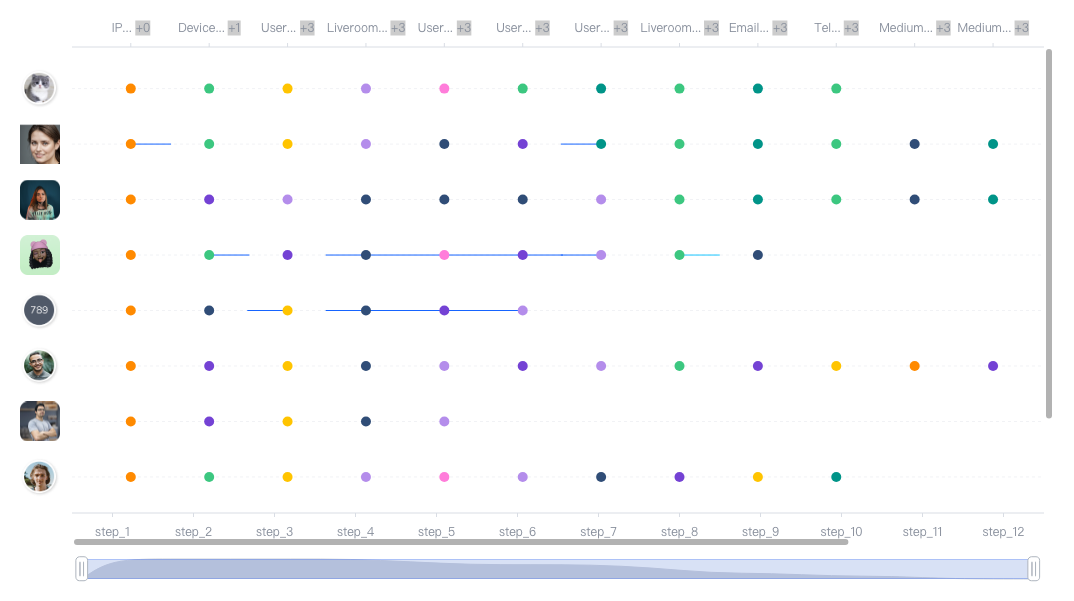!!!###!!!
Extension Chart: Sequence Analysis
Version requirement:sequenceAnalysis is available from @visactor/vchart-extension since VChart 2.2.0. Use 2.2.0 or later and keep @visactor/vchart and @visactor/vchart-extension versions identical. If you select an unsupported version in the live demo, upgrade it; this extension chart is not built into the core package.
Since 2.2.0, the dot and link series have also moved to @visactor/vchart-extension. The core package no longer exports or automatically registers DotSeries, LinkSeries, registerDotSeries, or registerLinkSeries; import IDotSeriesSpec and ILinkSeriesSpec from the extension package as well. registerSequenceChart({ VChart }) and registerSequenceAnalysis({ VChart }) register their required series. For standalone use in a common chart, import and call registerDotSeries() and registerLinkSeries() from the extension package.
Sequence Analysis places each user's events on a horizontal row, aligns events by time, step or medium, and draws their relationships. It supports behavior paths, relationships across users and repeated patterns.
The chart comes from @visactor/vchart-extension with type sequenceAnalysis. It is distinct from the sequence extension chart and the sequenceScatterLink extension for training-process analysis.
Choose a mode
Configuration
Horizontal axis
Connections
Appearance
mode: 'time', actionTarget: false
Millisecond timestamps
actionData
Straight lines; the top axis shows total event counts per timestamp
mode: 'time', actionTarget: true
Millisecond timestamps
actionData
Lines, midpoint avatars and target arrows
mode: 'step', mediumConnection: false
dots.step
patternData
Straight lines; top labels show medium names and additional counts
Install matching VChart and extension versions that include sequenceAnalysis, and register before creating the chart. The page needs a container with id="chart".
This complete minimal step example replaces image labels with user names through the transform callback, so userImageMap can be empty. The demo page uses the avatar URLs from the local demo.
For CDN usage, load the matching build/index.min.js files for both packages. Pass the actual chart constructor used by your page to the registration method:
// sequenceAnalysis requires VChart 2.2.0+ and the matching @visactor/vchart-extension.
// Register when available in the live demo; this chart still requires a supported version.
if (VChartExtension.registerSequenceAnalysis) {
  VChartExtension.registerSequenceAnalysis({ VChart: VChart.default });
}
const vchart = new VChart.default(spec, { dom: 'chart' });
vchart.renderSync();
Prepare events and links
Each eventData row contains user_id, user_image and nested dots. Do not flatten dots before passing data to the chart. Each event supplies node_name, step, medium_type, action_type, time_stamp and action_count. See the options for details.
node_name must be globally unique across users. Every link's from and to must reference existing events.
Time mode reads actionData; step mode reads patternData. Use empty arrays for no connections.
Dot colors are grouped by action_type; pattern links are grouped by pattern_type.
time_stamp is in milliseconds. The top time axis sums action_count across users at each timestamp, rather than counting rows.
stepMediumMap values are { medium_type, count } objects. Their count is an application-supplied additional quantity, independent of time-axis totals. Zero is displayed. Cover all steps in ordinary step mode; the other axis modes may use {}.
User and target avatars
Default vertical labels read userImageMap[user_id]. The image stored in an event row does not populate this map automatically.
With actionTarget enabled in time mode, the midpoint avatar reads actionData.user_image. Supplying actionData.user_id alone does not resolve the image. Disabling actionTarget hides avatars and arrows while keeping lines visible.
The transformer generates dot/link series, axes, a bottom DataZoom and horizontal/vertical ScrollBars. When two horizontal axes exist, the bottom scrollbar synchronizes their window proportions. Scrollbars initially show [0, 0.8]. Animation and tooltip are disabled by default.
Mutate the generated common-chart configuration in customTransformSpec. A returned object does not replace it:
Straight and curved connections both use link visible/style/state options; no curveLink configuration is needed. The interface's colors field is not currently wired to the palette, so use the standard color option above.
DataZoom and ScrollBar linkedAxisId / linkedAxisIndex synchronize window proportions only in axis filter mode. They do not copy axis domains. Linked axis option.
Updates and current limitation
Keep the original extension spec used to create the chart. The common-chart spec returned by getSpec() is not a substitute.
Time-mode count labels and markLine configurations are currently generated during spec transformation. updateDataSync('eventData', ...) and updateFullDataSync(...) update events without rebuilding those configurations, so labels or reference lines can remain stale.
Use a complete updateSpecSync instead. The following also switches the step example to time mode, regenerating count labels and reference lines:
When removing or renaming events, update actionData / patternData in the same complete spec. Also update userImageMap for user changes and stepMediumMap for step changes.


