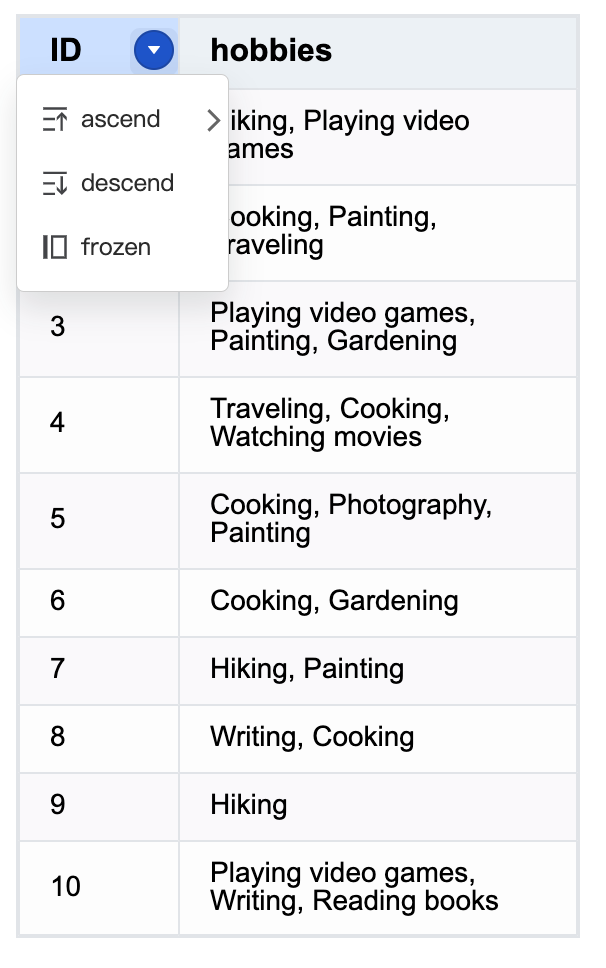
How to customize the drop-down menu in table component?
Question Description
How to customize the drop-down menu in the header part of the table component to support configuration icons and multi-level menus.
Solution
VTable supports two drop-down menu configuration methods:
- Configure globally Configuring the menu attribute in option will take effect on all headers that do not have a drop-down menu configured. The displayed menu items are configured in defaultHeaderMenuItems and support the following configurations:
- text: menu item text
- icon: menu item icon
- selectedIcon: menu item selected status icon
- children: secondary menu items
menu: {
  defaultHeaderMenuItems: [
    {
      text: 'ascend',
      icon: {
        svg: '<svg width="14" height="14" viewBox="0 0 96 96" fill="none" xmlns="http://www.w3.org/2000/svg"><path fill-rule="evenodd" clip-rule="evenodd" d="M71 24L88 41.0286V53.0005L74.996 39.9755L74.9968 88.0005H66.9968L66.996 39.9835L54 53.0005V41.0286L71 24ZM48 80V88H8V80H48ZM48 44V52H8V44H48ZM88 8V16H8V8H88Z" fill="#2e2f32" fill-opacity="0.9"></path></svg>'
      },
      selectedIcon: {
        svg: '<svg width="14" height="14" viewBox="0 0 96 96" fill="none" xmlns="http://www.w3.org/2000/svg"><path fill-rule="evenodd" clip-rule="evenodd" d="M71 24L88 41.0286V53.0005L74.996 39.9755L74.9968 88.0005H66.9968L66.996 39.9835L54 53.0005V41.0286L71 24ZM48 80V88H8V80H48ZM48 44V52H8V44H48ZM88 8V16H8V8H88Z" fill="rgb(55,145,255)" fill-opacity="0.9"></path></svg>'
      },
      children: [
        {
          text: 'ascend',
          icon: {
            svg: '<svg width="14" height="14" viewBox="0 0 96 96" fill="none" xmlns="http://www.w3.org/2000/svg"><path fill-rule="evenodd" clip-rule="evenodd" d="M71 24L88 41.0286V53.0005L74.996 39.9755L74.9968 88.0005H66.9968L66.996 39.9835L54 53.0005V41.0286L71 24ZM48 80V88H8V80H48ZM48 44V52H8V44H48ZM88 8V16H8V8H88Z" fill="#2e2f32" fill-opacity="0.9"></path></svg>'
          },
          selectedIcon: {
            svg: '<svg width="14" height="14" viewBox="0 0 96 96" fill="none" xmlns="http://www.w3.org/2000/svg"><path fill-rule="evenodd" clip-rule="evenodd" d="M71 24L88 41.0286V53.0005L74.996 39.9755L74.9968 88.0005H66.9968L66.996 39.9835L54 53.0005V41.0286L71 24ZM48 80V88H8V80H48ZM48 44V52H8V44H48ZM88 8V16H8V8H88Z" fill="rgb(55,145,255)" fill-opacity="0.9"></path></svg>'
          },
          menuKey: 'ascend1'
        },
        {
          text: 'descend',
          icon: {
            svg: '<svg width="14" height="14" viewBox="0 0 96 96" fill="none" xmlns="http://www.w3.org/2000/svg"><path fill-rule="evenodd" clip-rule="evenodd" d="M71 89.0005L54 71.9719L54 60L67.004 73.025L67.0032 25L75.0032 25L75.004 73.017L88 60V71.9719L71 89.0005ZM48 81V89H8V81H48ZM48 45V53H8V45H48ZM88 9V17H8V9H88Z" fill="#2e2f32" fill-opacity="0.9"></path></svg>'
          },
          selectedIcon: {
            svg: '<svg width="14" height="14" viewBox="0 0 96 96" fill="none" xmlns="http://www.w3.org/2000/svg"><path fill-rule="evenodd" clip-rule="evenodd" d="M71 89.0005L54 71.9719L54 60L67.004 73.025L67.0032 25L75.0032 25L75.004 73.017L88 60V71.9719L71 89.0005ZM48 81V89H8V81H48ZM48 45V53H8V45H48ZM88 9V17H8V9H88Z" fill="rgb(55,145,255)" fill-opacity="0.9"></path></svg>'
          },
          menuKey: 'descend1'
        }
      ]
    }
    // ......
  ];
}
- Configure in the header dropDownMenu can be configured in columns. The items are the same as defaultHeaderMenuItems. The menu only takes effect in the corresponding column.
- Menu selection status update After the drop-down menu item is selected, the "dropdown_menu_click" event will be triggered. The listening event updates the drop-down menu status through the setDropDownMenuHighlight interface. The selected item text and icon will change the style.
table.on('dropdown_menu_click', (args: any) => {
  console.log('dropdown_menu_click', args);
  table.setDropDownMenuHighlight([args]);
});
Code Example
const columns = [
  {
    field: 'id',
    title: 'ID',
    width: 80
  },
  {
    field: 'hobbies',
    title: 'hobbies',
    width: 200,
    dropDownMenu: ['item1', 'item2']
  }
];
const option: TYPES.ListTableConstructorOptions = {
  records,
  columns,
  heightMode: 'autoHeight',
  autoWrapText: true,
  menu: {
    defaultHeaderMenuItems: [
      {
        text: 'ascend',
        icon: {
          svg: '<svg width="14" height="14" viewBox="0 0 96 96" fill="none" xmlns="http://www.w3.org/2000/svg"><path fill-rule="evenodd" clip-rule="evenodd" d="M71 24L88 41.0286V53.0005L74.996 39.9755L74.9968 88.0005H66.9968L66.996 39.9835L54 53.0005V41.0286L71 24ZM48 80V88H8V80H48ZM48 44V52H8V44H48ZM88 8V16H8V8H88Z" fill="#2e2f32" fill-opacity="0.9"></path></svg>'
        },
        selectedIcon: {
          svg: '<svg width="14" height="14" viewBox="0 0 96 96" fill="none" xmlns="http://www.w3.org/2000/svg"><path fill-rule="evenodd" clip-rule="evenodd" d="M71 24L88 41.0286V53.0005L74.996 39.9755L74.9968 88.0005H66.9968L66.996 39.9835L54 53.0005V41.0286L71 24ZM48 80V88H8V80H48ZM48 44V52H8V44H48ZM88 8V16H8V8H88Z" fill="rgb(55,145,255)" fill-opacity="0.9"></path></svg>'
        },
        children: [
          {
            text: 'ascend',
            icon: {
              svg: '<svg width="14" height="14" viewBox="0 0 96 96" fill="none" xmlns="http://www.w3.org/2000/svg"><path fill-rule="evenodd" clip-rule="evenodd" d="M71 24L88 41.0286V53.0005L74.996 39.9755L74.9968 88.0005H66.9968L66.996 39.9835L54 53.0005V41.0286L71 24ZM48 80V88H8V80H48ZM48 44V52H8V44H48ZM88 8V16H8V8H88Z" fill="#2e2f32" fill-opacity="0.9"></path></svg>'
            },
            selectedIcon: {
              svg: '<svg width="14" height="14" viewBox="0 0 96 96" fill="none" xmlns="http://www.w3.org/2000/svg"><path fill-rule="evenodd" clip-rule="evenodd" d="M71 24L88 41.0286V53.0005L74.996 39.9755L74.9968 88.0005H66.9968L66.996 39.9835L54 53.0005V41.0286L71 24ZM48 80V88H8V80H48ZM48 44V52H8V44H48ZM88 8V16H8V8H88Z" fill="rgb(55,145,255)" fill-opacity="0.9"></path></svg>'
            },
            menuKey: 'ascend1'
          },
          {
            text: 'descend',
            icon: {
              svg: '<svg width="14" height="14" viewBox="0 0 96 96" fill="none" xmlns="http://www.w3.org/2000/svg"><path fill-rule="evenodd" clip-rule="evenodd" d="M71 89.0005L54 71.9719L54 60L67.004 73.025L67.0032 25L75.0032 25L75.004 73.017L88 60V71.9719L71 89.0005ZM48 81V89H8V81H48ZM48 45V53H8V45H48ZM88 9V17H8V9H88Z" fill="#2e2f32" fill-opacity="0.9"></path></svg>'
            },
            selectedIcon: {
              svg: '<svg width="14" height="14" viewBox="0 0 96 96" fill="none" xmlns="http://www.w3.org/2000/svg"><path fill-rule="evenodd" clip-rule="evenodd" d="M71 89.0005L54 71.9719L54 60L67.004 73.025L67.0032 25L75.0032 25L75.004 73.017L88 60V71.9719L71 89.0005ZM48 81V89H8V81H48ZM48 45V53H8V45H48ZM88 9V17H8V9H88Z" fill="rgb(55,145,255)" fill-opacity="0.9"></path></svg>'
            },
            menuKey: '降序排序1'
          }
        ]
      },
      {
        text: 'descend',
        icon: {
          svg: '<svg width="14" height="14" viewBox="0 0 96 96" fill="none" xmlns="http://www.w3.org/2000/svg"><path fill-rule="evenodd" clip-rule="evenodd" d="M71 89.0005L54 71.9719L54 60L67.004 73.025L67.0032 25L75.0032 25L75.004 73.017L88 60V71.9719L71 89.0005ZM48 81V89H8V81H48ZM48 45V53H8V45H48ZM88 9V17H8V9H88Z" fill="#2e2f32" fill-opacity="0.9"></path></svg>'
        },
        selectedIcon: {
          svg: '<svg width="14" height="14" viewBox="0 0 96 96" fill="none" xmlns="http://www.w3.org/2000/svg"><path fill-rule="evenodd" clip-rule="evenodd" d="M71 89.0005L54 71.9719L54 60L67.004 73.025L67.0032 25L75.0032 25L75.004 73.017L88 60V71.9719L71 89.0005ZM48 81V89H8V81H48ZM48 45V53H8V45H48ZM88 9V17H8V9H88Z" fill="rgb(55,145,255)" fill-opacity="0.9"></path></svg>'
        }
      },
      {
        text: 'frozen',
        icon: {
          svg: '<svg width="14" height="14" viewBox="0 0 96 96" fill="none" xmlns="http://www.w3.org/2000/svg"><path fill-rule="evenodd" clip-rule="evenodd" d="M8 8H22V88H8V8ZM34 88V8H88V88H34ZM80 16H42V80H80V16Z" fill="#2e2f32" fill-opacity="0.9"></path></svg>'
        }
      }
    ]
  }
};
const table = new ListTable(document.getElementById('container'), option);
table.on('dropdown_menu_click', (args: any) => {
  console.log('dropdown_menu_click', args);
  table.setDropDownMenuHighlight([args]);
});
Results